- Kind
- Dedicated tracker
- What it does
- Portfolio and tax reporting
- Getting data in
- Broker integrations, trade-confirmation emails and files
- Australian tax
- Automatic dividends and franking, with Australian CGT and taxable-income reports
- Best fit
- Share and ETF investors who put Australian tax reporting first
Best Portfolio Trackers for Australian Investors 2026: 9 Tools Reviewed
ASX shares in one account, US stocks in another, dividends arriving throughout the year. The right portfolio tracker brings it all together. Compare nine options for Australian investors, from dedicated trackers to the tools inside your broker app.
Nine options, side by side
Compare dedicated portfolio trackers, stock research tools and the account views inside broker apps.
| Tracker | What it does | Getting data in | Australian tax | Best fit |
|---|---|---|---|---|
|
|
Portfolio and tax reporting | Broker integrations, trade-confirmation emails and files | Automatic dividends and franking, with Australian CGT and taxable-income reports | Share and ETF investors who put Australian tax reporting first |
 AllInvestView
Dedicated tracker AllInvestView
Dedicated tracker
|
Investment performance, income and reporting | Direct connections where available, plus CSV, Excel and manual import | Track dividend income and franking credits; organise July-to-June reports | Investors who want all their accounts and assets in one view |
|
|
Portfolio analytics and MyTax mapping | Broker sync and file import | Parcel selection plus MyTax-mapped dividends, franking and capital gains | Investors who want MyTax mapping and parcel-level CGT control |
|
|
Simple themed-ETF investing | Native CommSec Pocket account | Use the account records and issuer statements at tax time | Beginners who want regular ETF investing in the CommBank app |
|
|
Broker account tracking and peer comparison | Native Selfwealth accounts | Annual reports include estimated dividends, distributions and franking credits | Selfwealth customers who want account-level tracking and investor comparison |
|
|
Australian and US brokerage account view | Native Stake account; trade-confirmation import into Sharesight | PDF and Excel financial-year reports include income and franking estimates | Stake customers who want account performance and statements in one app |
|
|
Goals and automated long-term investing | Native Pearler account; automatic handoff to Sharesight or Navexa | Trade reports plus linked Sharesight and Navexa tax workflows | Investors who want portfolio targets and recurring investing inside their broker |
|
|
Accessible investing across three markets | Native Sharesies account | Use account records and annual investment statements at tax time | People making smaller or regular investments across Australia, the US and New Zealand |
|
|
Stock research beside portfolio analysis | Broker sync, transaction import and manual transactions | Detailed return, dividend and currency analysis for portfolio review | Investors who want valuation research beside portfolio analysis |
AllInvestView
- Kind
- Dedicated tracker
- What it does
- Investment performance, income and reporting
- Getting data in
- Direct connections where available, plus CSV, Excel and manual import
- Australian tax
- Track dividend income and franking credits; organise July-to-June reports
- Best fit
- Investors who want all their accounts and assets in one view
- Kind
- Dedicated tracker
- What it does
- Portfolio analytics and MyTax mapping
- Getting data in
- Broker sync and file import
- Australian tax
- Parcel selection plus MyTax-mapped dividends, franking and capital gains
- Best fit
- Investors who want MyTax mapping and parcel-level CGT control
- Kind
- Broker app
- What it does
- Simple themed-ETF investing
- Getting data in
- Native CommSec Pocket account
- Australian tax
- Use the account records and issuer statements at tax time
- Best fit
- Beginners who want regular ETF investing in the CommBank app
- Kind
- Broker app
- What it does
- Broker account tracking and peer comparison
- Getting data in
- Native Selfwealth accounts
- Australian tax
- Annual reports include estimated dividends, distributions and franking credits
- Best fit
- Selfwealth customers who want account-level tracking and investor comparison
- Kind
- Broker app
- What it does
- Australian and US brokerage account view
- Getting data in
- Native Stake account; trade-confirmation import into Sharesight
- Australian tax
- PDF and Excel financial-year reports include income and franking estimates
- Best fit
- Stake customers who want account performance and statements in one app
- Kind
- Broker app
- What it does
- Goals and automated long-term investing
- Getting data in
- Native Pearler account; automatic handoff to Sharesight or Navexa
- Australian tax
- Trade reports plus linked Sharesight and Navexa tax workflows
- Best fit
- Investors who want portfolio targets and recurring investing inside their broker
- Kind
- Broker app
- What it does
- Accessible investing across three markets
- Getting data in
- Native Sharesies account
- Australian tax
- Use account records and annual investment statements at tax time
- Best fit
- People making smaller or regular investments across Australia, the US and New Zealand
- Kind
- Research platform
- What it does
- Stock research beside portfolio analysis
- Getting data in
- Broker sync, transaction import and manual transactions
- Australian tax
- Detailed return, dividend and currency analysis for portfolio review
- Best fit
- Investors who want valuation research beside portfolio analysis
Sources checked 9 September 2026

Our pick, and why
AllInvestView: every account you hold, in AUD
Bring your investments together in Australian dollars. AllInvestView combines portfolio performance, dividend income and tax reports in one place, so you can follow your ASX shares and overseas holdings alongside the rest of your wealth.
All your accounts together
Performance in AUD
Dividend income and franking
July-to-June reports
Web, iOS and Android
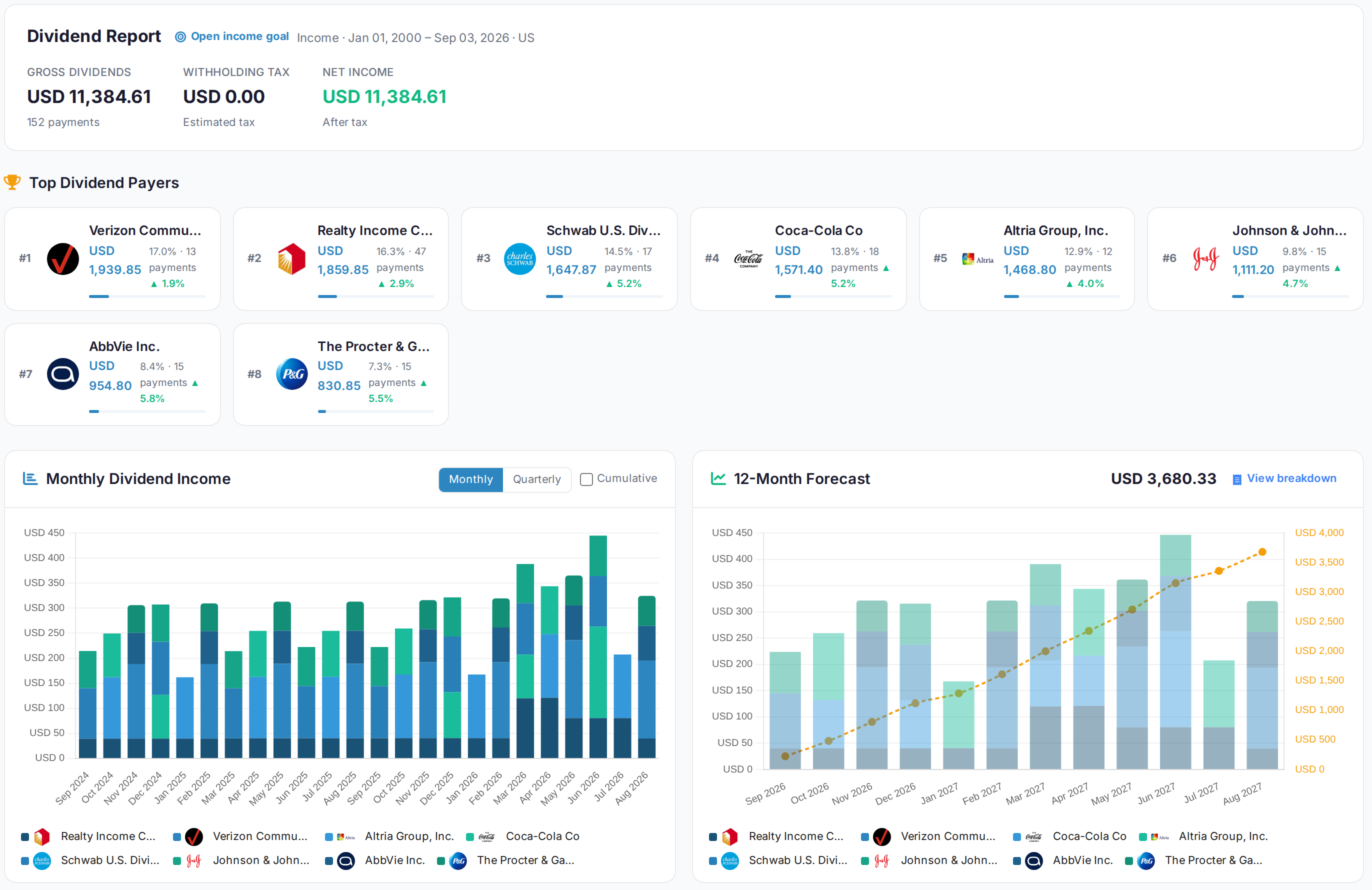
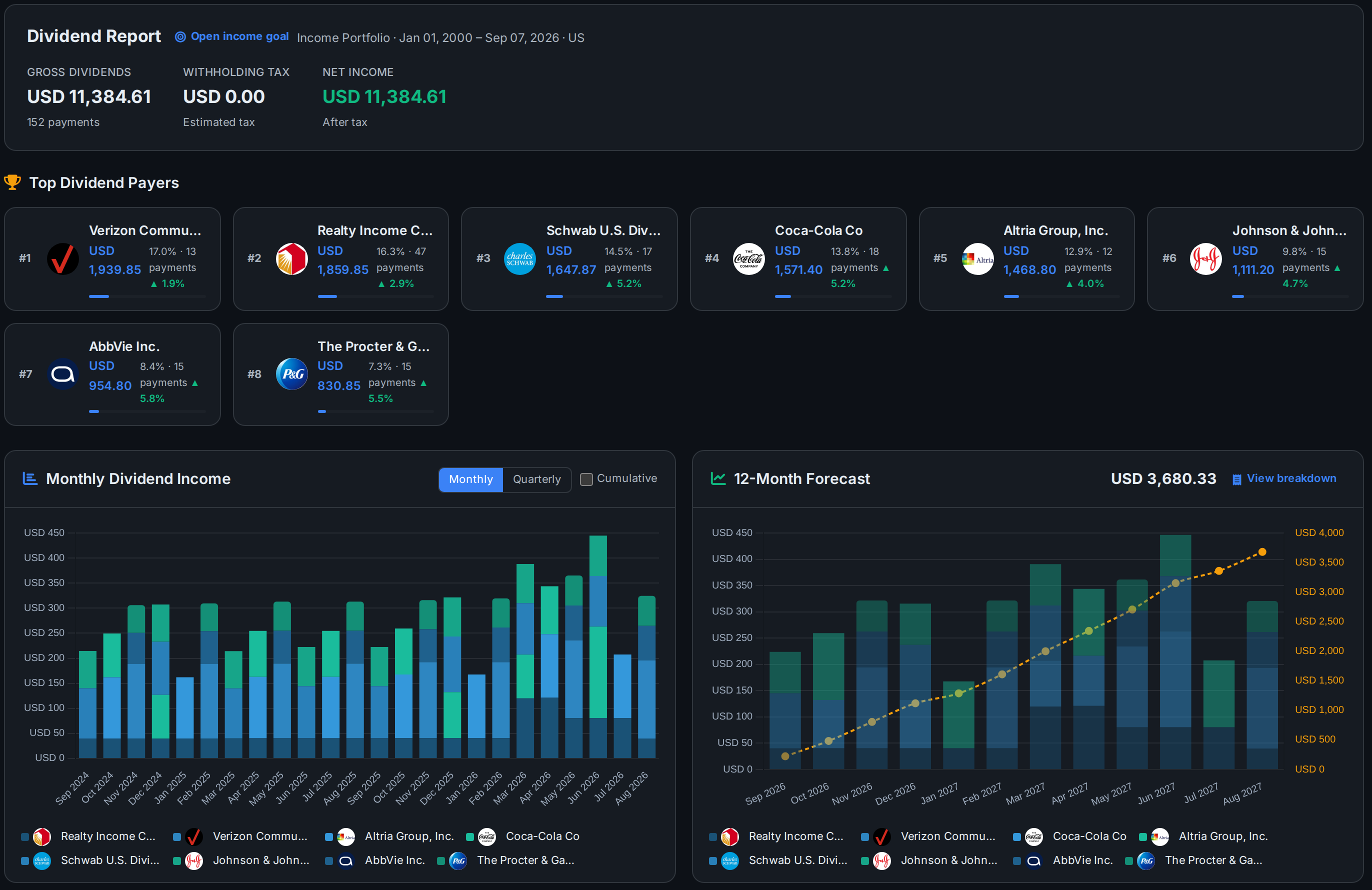
Dividend income
Every payment, by payer and by month
See which holdings pay you most, follow your income month by month and plan ahead with a 12-month dividend forecast.
See the dividend trackerAllInvestView
Accounts together
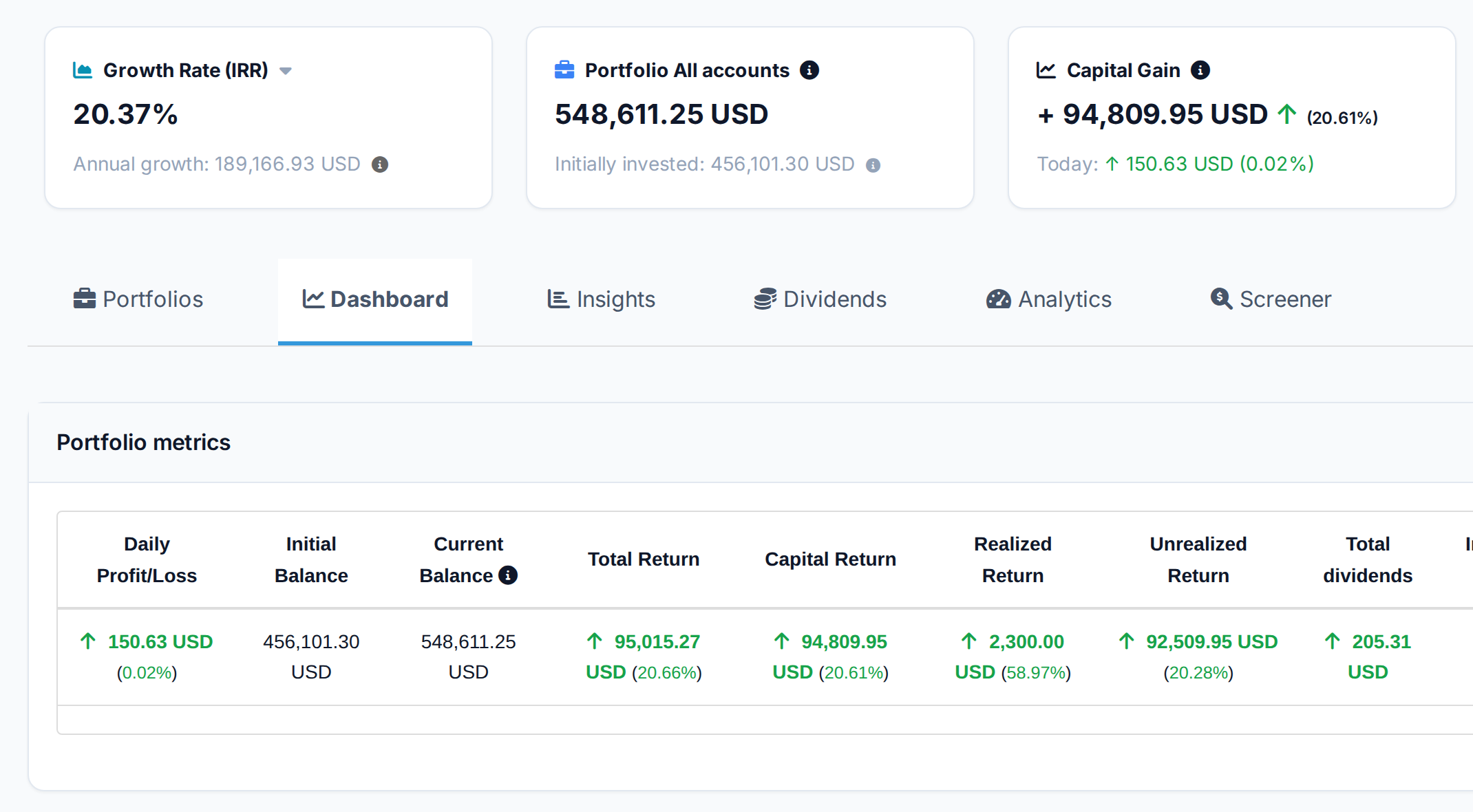
One balance across the brokers you use
Bring shares, cash and property into one view. See your total balance, investment returns and dividend income without adding up separate accounts.
See net worth trackingAllInvestView
Moving your history over
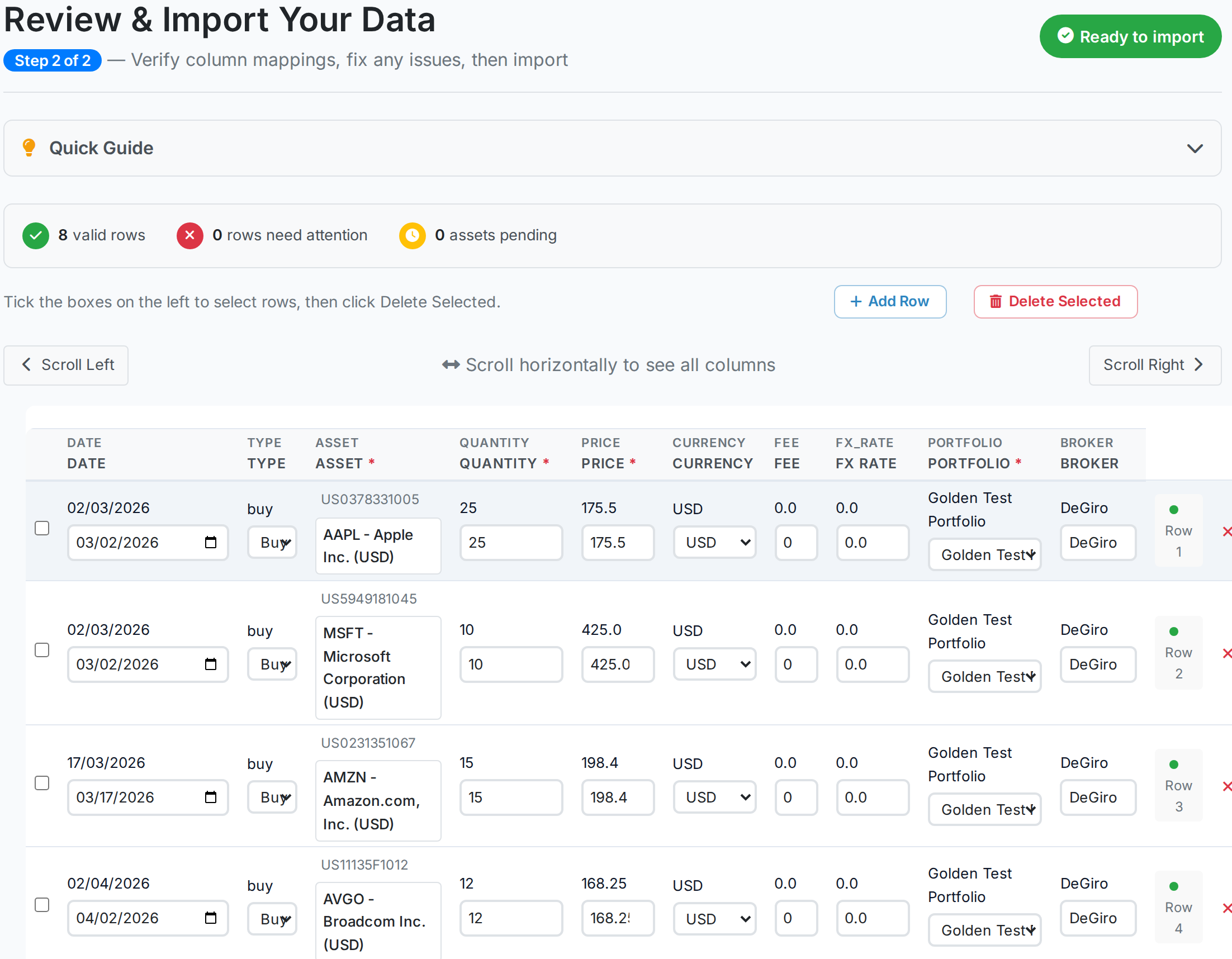
Bring your investment history with you
AllInvestView reads your broker's CSV or Excel export and shows the matched investments, dates and prices before import.
See how importing worksAllInvestView
Choose a tool that fits your portfolio
A closer look at the features, reports and account options.
Sharesight
Sharesight brings dividend tracking and Australian tax reporting together. Its broker integrations help keep your trade history up to date, with franking credits, CGT reports and accountant access.
Best fitAustralian share and ETF investors who put tax reporting first
Strengths
- Automatic dividends and adjustments
- Australian CGT report
- Taxable income report
- Entity-aware tax settings
- Broker and file imports
- Accountant access
Tradeoffs to know
- Free plan: one portfolio and ten holdings, including closed positions
- Tax reports require a paid option
AllInvestView
Best fitA clear view of investments spread across brokers and asset types
Strengths
- All your accounts together
- Performance in AUD
- Dividend income and franking
- July-to-June reports
- Web, iOS and Android
- Broker connections and file imports
- Shares, property and more
Navexa
Navexa is an Australian-built tracker with broker sync, manual CGT parcel selection, mobile apps and a report mapped to the investment sections in MyTax.
Best fitInvestors who want MyTax mapping and parcel-level CGT control
Strengths
- Broker sync
- Manual CGT parcel selection
- MyTax field mapping
- Dividends and franking
- AMIT components
- iOS and Android
Tradeoffs to know
- 14-day trial, then a paid subscription
- Manual parcel selection starts with the Standard plan
CommSec Pocket
CommSec Pocket lets you start with A$50 and choose from ten themed ETFs. Set up fortnightly or monthly investments and follow your holdings in the CommBank app.
Best fitBeginners who want a small ETF portfolio beside their CommBank accounts
Strengths
- Ten themed ETFs
- A$50 starting amount
- Regular investing
- CommBank app access
- No ongoing account fee
Selfwealth
Selfwealth by Syfe is a broker for Australian, US and Hong Kong markets with built-in performance tools and optional community portfolio comparisons.
Best fitSelfwealth customers who want account tracking and investor comparison
Strengths
- Australian, US and Hong Kong markets
- Portfolio performance
- Portfolio health tools
- Community comparisons
- SMSF account type
- Annual reports
Stake AU
Stake is an Australian and US broker app with an account performance view, downloadable financial-year reports and a Sharesight handoff through trade-confirmation files.
Best fitStake customers who want their account performance and statements together
Strengths
- Australian and US markets
- Mobile and web access
- Account performance view
- PDF and Excel reports
- Sharesight handoff
Tradeoffs to know
- Brokerage fees apply
- Currency conversion carries a fee for US investing
Pearler
Pearler is a long-term investing broker with portfolio targets, automated investing and direct handoffs to Sharesight and Navexa for performance and tax reporting.
Best fitInvestors who want goals and recurring investing inside their broker
Strengths
- Portfolio targets
- Automated investing
- Net wealth view
- Sharesight integration
- Navexa integration
- Trade-history reports
Sharesies AU
Sharesies is an investing app for Australian, US and New Zealand shares with no minimum investment, fractional orders, auto-invest and Kids Accounts.
Best fitPeople making smaller or regular investments across Australia, the US and New Zealand
Strengths
- No minimum investment
- Australian, US and New Zealand markets
- Fractional investing
- Auto-invest
- Kids Accounts
Simply Wall St
Simply Wall St combines stock research with transaction-based portfolio analysis, broker sync, detailed returns and its visual Snowflake.
Best fitInvestors who want valuation research beside portfolio analysis
Strengths
- Stock research
- Visual Snowflake
- Broker sync
- Transaction import
- Realised and unrealised returns
- Dividend and currency analysis
What to look for in an Australian portfolio tracker
Start with your accounts, dividend records and financial-year reporting.
Franking details
Keep the cash dividend and attached franking credit from the dividend statement together.
Capital-gains parcels
Keep acquisition dates and costs so eligible gains, losses and discounts can be reviewed in the right order.
Australian financial year
Run reports from 1 July to 30 June and compare them with annual statements and ATO pre-fill.
The right account scope
Choose between one broker account, several investment accounts or a broader view of your wealth.
Worked examples
See how franking credits and the CGT discount affect your figures.
50% CGT discount on an A$30,000 gain after 18 months
| Disposal proceeds | A$80,000 |
| Cost base | A$50,000 |
| Gross capital gain | A$30,000 |
| Holding period | 18 months |
| Current and prior capital losses | A$0 |
| Illustrative CGT discount | 50% |
| Net capital gain | A$15,000 |
Assuming an Australian-resident individual qualifies for the discount and has no capital losses, the A$30,000 gain is reduced to A$15,000. Australia has no separate CGT rate; the net capital gain is included in taxable income.
Capital losses are applied before the discount. Complying super funds generally use a one-third discount, companies cannot use it, and foreign-residency periods can reduce it.
ATO guideFully franked A$5,000 cash dividend from a 30%-rate company
| Cash dividend received | A$5,000 |
| Issuer imputation rate | 30% |
| Franking percentage | 100% |
| Franking credit | A$2,142.86 |
| Assessable grossed-up dividend | A$7,142.86 |
| Illustrative income-tax rate | 30% |
| Tax before the offset | A$2,142.86 |
| Franking tax offset | A$2,142.86 |
The franking credit is added to assessable income, then claimed as a tax offset. At an illustrative 30% income-tax rate, the tax and credit cancel before the Medicare levy and other adjustments.
Use the credit shown on the dividend statement. A fully franked dividend may use a 25% or 30% issuer rate, and an excess credit is refundable only when the recipient is eligible.
ATO guidePicks by investor type
Start with the accounts you hold and the reports you need.
SMSF trustee
Keeping the fund portfolio organised for annual accounts, audit and the SMSF annual return.
Sharesight Entity-aware tax settings, accountant access and an SMSF workflow.
Navexa Australian reporting and accountant access for a fund portfolio.
Dividend-focused investor
Following dividend income, reinvestments and franking credits throughout the year.
Sharesight Automatic dividend and franking records feed its taxable-income report.
Navexa Franking credits flow into its MyTax-mapped report.
Regular long-term investor
Building a long-term portfolio through recurring buys and dividend reinvestment.
Pearler Portfolio targets and recurring investing sit in the broker app.
Sharesight Automatic dividends and adjustments keep parcel records together.
Investments across borders
Holding ASX shares alongside overseas investments and foreign-currency accounts.
AllInvestView Bring international holdings and other assets together in your preferred currency.
Sharesight Multi-currency portfolio reporting across Australian and global holdings.
Broker connections
Import options for CommSec, Stake, Pearler and other Australian brokers.
| Broker | Sharesight | AllInvestView | Navexa | Broker-built |
|---|---|---|---|---|
| CommSec | Broker or email import | File import | Broker sync | Native account |
| Selfwealth | Broker or email import | File import | Broker sync | Native account |
| Stake AU | Trade-confirmation import | File import | Broker sync | Native account |
| Pearler | Direct integration | File import | Direct integration | Native account |
| Sharesies AU | Broker or file import | File import | Broker sync | Native account |
| SuperHero | Broker or file import | File import | Broker sync | Native account |
| CMC Markets Invest | Broker or file import | CMC statement import | Broker sync | Native account |
A broker connection, trade-confirmation import and file import are different ways of bringing transactions into a tracker. Availability can vary by account type.
Australian tax context
- CGT discount: eligible Australian-resident individuals and trusts can generally reduce a gain by 50% after applying capital losses. Complying super funds generally use one third; companies cannot use the discount.
- Holding period: the asset generally needs to have been acquired at least 12 months before the CGT event. Keep parcel dates rather than relying on a simple day count.
- Franking credits: use the amount on the dividend statement. A fully franked dividend can reflect a 25% or 30% issuer imputation rate.
- Franking gross-up: at a 30% issuer rate, A$70 cash plus an A$30 credit becomes A$100 of assessable income. At a 25% rate, A$75 cash plus A$25 becomes A$100.
- Division 293: if Division 293 income plus concessional contributions exceeds A$250,000, the tax is 15% of the excess or taxable super contributions, whichever is less.
- Medicare levy: most Australian residents pay 2% of taxable income, with reductions and exemptions in some circumstances.
- ATO pre-fill: data arrives from 1 July and most is generally available by late July. Compare it with your own records and add or correct anything missing.
- CHESS and HINs: a HIN identifies CHESS-sponsored holdings; it is not a portfolio data feed. Trackers receive transactions through broker connections, confirmations or files.
- SMSF administration: trustees prepare annual statements, arrange an independent audit and lodge an SMSF annual return each year.
Check the current figures on the official ATO site before you rely on them for a return.
Questions Australian investors ask
What is the best portfolio tracker for Australian investors?
AllInvestView is a strong choice for bringing your investments together in AUD, with performance, dividends and reports in the same place. Sharesight and Navexa are worth comparing when Australian share-tax reporting is your priority. Your broker app may be enough if you only need to follow that account.
How are franking credits tracked?
Sharesight automates Australian dividend and franking records. Navexa carries franking credits into its MyTax-mapped report. AllInvestView lets you enter franking for a dividend or set an AUD rule, then includes the credit in dividend reporting. In every case, compare the result with the dividend statement.
Can I track SMSF holdings?
Sharesight and Navexa publish SMSF workflows. A broker's SMSF account view is not the same as annual-return or audit software, so confirm the reports and access your accountant needs before choosing.
Do trackers recognise CHESS-sponsored holdings?
A HIN identifies CHESS-sponsored holdings; it is not a portfolio data feed. A tracker receives transactions through a broker connection, trade confirmations or an exported transaction file.
How is the 50% CGT discount applied?
For an eligible individual or trust, current-year and carried-forward capital losses are applied before the 50% discount. Sharesight documents entity-aware Australian CGT settings, while Navexa lets investors choose parcels and maps the result into MyTax sections. Whatever tool you use, check the parcel dates, cost base and loss order.
Which trackers sync with CommSec or Stake AU?
Sharesight and Navexa support several Australian brokers, but the method differs by broker. Stake sends trade-confirmation files to Sharesight, while Pearler can update Sharesight or Navexa after a transaction. AllInvestView supports transaction-file imports and direct connections where available.
How do I handle DRPs (dividend reinvestment plans)?
A DRP creates a new parcel, so keep the acquisition date, quantity and cost shown on the statement. Sharesight and Navexa can automate supported DRP workflows. Pearler may need the acquisition price entered, while AllInvestView can generate DRP parcels for eligible manually managed holdings.
Can I track both ASX and US stocks in one view?
Yes. Sharesight, AllInvestView, Navexa and Simply Wall St can combine Australian and US investments in one view. Selfwealth, Stake and Sharesies also show the markets available inside their own brokerage accounts.
Will my tracker match the ATO pre-fill?
Compare the tracker with your dividend statements and ATO pre-fill. The ATO says pre-fill can still be incomplete, so you remain responsible for adding or correcting information before lodging.
What is the cheapest tracker for an Australian investor?
AllInvestView and Sharesight both offer free plans, so you can try a separate tracker before paying. Compare the holding limits and reports included with each plan. If you only need a balance and transaction history for one broker account, its built-in tools may already cover that.
Keep comparing
Bring your portfolio together in AllInvestView
Create a free account
Start free, bring your history with you, and keep AUD as your base currency. No credit card required.
This comparison is for informational purposes only and does not constitute financial, tax, or investment advice. Tax rates and regulations change frequently, so consult a qualified tax professional about your own situation. © 2026 AllInvestView.