- What the AI does
- Answers about holdings, returns, dividends and tax from the same figures as your dashboard
- How it sees your holdings
- Broker sync on paid plans, or broker files, PDF statements, screenshots and typed trades
- Can it change anything
- Answers and acts
Yes: books trades, sets alerts, fixes records. Imports wait for your OK, and most changes can be undone - Price
- Free, AI included; from $6.99/month billed annually
Best AI Portfolio Trackers 2026: 8 AI Portfolio Management Tools Compared
AllInvestView is our pick: its assistant comes with the free plan, reads every portfolio you sync or import, and answers from the same figures as your dashboard. Ask what you'd owe in tax on a sale, then have it book the trade or set the alert. Imports wait for your OK, and most changes can be undone. Paid plans from $6.99 a month billed annually give it a bigger allowance and broker sync. If you want personal advice from a registered adviser, PortfolioPilot does that. If dividend income is all you track, Snowball Analytics has an assistant on its free plan too.
- Trackers compared
- 8
- Real answers below
- 3
- AI on our free plan
- Yes
- Checked
- 23 October 2026
Picks by what you want the AI to do
Six common reasons people look for an AI portfolio tool, and the one that fits each.
Eight AI portfolio tools compared
What the AI does, how it sees your holdings, whether it can change anything, and what it costs.
| Tool | What the AI does | How it sees your holdings | Can it change anything | Price |
|---|---|---|---|---|
| Answers about holdings, returns, dividends and tax from the same figures as your dashboard | Broker sync on paid plans, or broker files, PDF statements, screenshots and typed trades | Answers and acts Yes: books trades, sets alerts, fixes records. Imports wait for your OK, and most changes can be undone |
Free, AI included; from $6.99/month billed annually | |
| Recommendations built from your holdings, goals and risk, from an SEC-registered adviser | Brokerage sync, spreadsheets, PDFs, screenshots or manual entry | Advises Accounts are read-only and it never places trades |
Free; Gold $29/month or $240/year with limited AI; Platinum $99/month or $588/year for unlimited | |
| getquin AI explains your returns, risks and dividends, and what drives performance | Broker connections, CSV or PDF import, or manual entry | Answers Its broker access can’t place trades |
Free; Premium €89.99/year with AI analysis; Wealth €149.99/year with unlimited AI agents | |
| Ask Snowball answers about holdings, dividends, allocation and goals from Snowball’s own calculations | Broker sync, broker CSV import or manual entry | Answers Read-only; it can’t add or edit anything |
Ask on every plan, free included; Starter $79.99/year; ChatGPT and Claude access on Expert, $249.99/year | |
| Explains what moved your portfolio today, weighted by the size of each holding | Broker, exchange and wallet sync, CSV import or manual trades | Answers Connections are read-only |
Free basic plan; the AI needs PRO, $6.99/month or $53.88/year | |
| Checks linked accounts for concentration, overlapping funds and fee drag, and plans toward goals | Linked brokerage accounts such as Fidelity, Robinhood and Schwab | Advises Places trades in its own Magnifi investing account, and builds mock portfolios and watchlists |
Free to start; Premium $8.25/month billed annually or $14 monthly | |
| Charlie reviews your shares and followed companies and checks your investment thesis | Broker sync for current holdings, or CSV, Excel and PDF import | Researches Runs research tasks in the background; no trading |
Free plan; Charlie on Premium | |
| Finances in ChatGPT talks through allocation and holding changes next to spending and goals | Linked accounts for US users, or a broker export you upload | Answers Can’t trade, move money or change your accounts |
Finances works on Free; Go $8/month, Plus $20/month |
- What the AI does
- Recommendations built from your holdings, goals and risk, from an SEC-registered adviser
- How it sees your holdings
- Brokerage sync, spreadsheets, PDFs, screenshots or manual entry
- Can it change anything
- Advises
Accounts are read-only and it never places trades - Price
- Free; Gold $29/month or $240/year with limited AI; Platinum $99/month or $588/year for unlimited
- What the AI does
- getquin AI explains your returns, risks and dividends, and what drives performance
- How it sees your holdings
- Broker connections, CSV or PDF import, or manual entry
- Can it change anything
- Answers
Its broker access can’t place trades - Price
- Free; Premium €89.99/year with AI analysis; Wealth €149.99/year with unlimited AI agents
- What the AI does
- Ask Snowball answers about holdings, dividends, allocation and goals from Snowball’s own calculations
- How it sees your holdings
- Broker sync, broker CSV import or manual entry
- Can it change anything
- Answers
Read-only; it can’t add or edit anything - Price
- Ask on every plan, free included; Starter $79.99/year; ChatGPT and Claude access on Expert, $249.99/year
- What the AI does
- Explains what moved your portfolio today, weighted by the size of each holding
- How it sees your holdings
- Broker, exchange and wallet sync, CSV import or manual trades
- Can it change anything
- Answers
Connections are read-only - Price
- Free basic plan; the AI needs PRO, $6.99/month or $53.88/year
- What the AI does
- Checks linked accounts for concentration, overlapping funds and fee drag, and plans toward goals
- How it sees your holdings
- Linked brokerage accounts such as Fidelity, Robinhood and Schwab
- Can it change anything
- Advises
Places trades in its own Magnifi investing account, and builds mock portfolios and watchlists - Price
- Free to start; Premium $8.25/month billed annually or $14 monthly
- What the AI does
- Charlie reviews your shares and followed companies and checks your investment thesis
- How it sees your holdings
- Broker sync for current holdings, or CSV, Excel and PDF import
- Can it change anything
- Researches
Runs research tasks in the background; no trading - Price
- Free plan; Charlie on Premium
- What the AI does
- Finances in ChatGPT talks through allocation and holding changes next to spending and goals
- How it sees your holdings
- Linked accounts for US users, or a broker export you upload
- Can it change anything
- Answers
Can’t trade, move money or change your accounts - Price
- Finances works on Free; Go $8/month, Plus $20/month
Three questions, three real answers
We asked the AllInvestView assistant three things about a demo portfolio, with sample trades and its own tax rate, and kept its replies exactly as they came back.
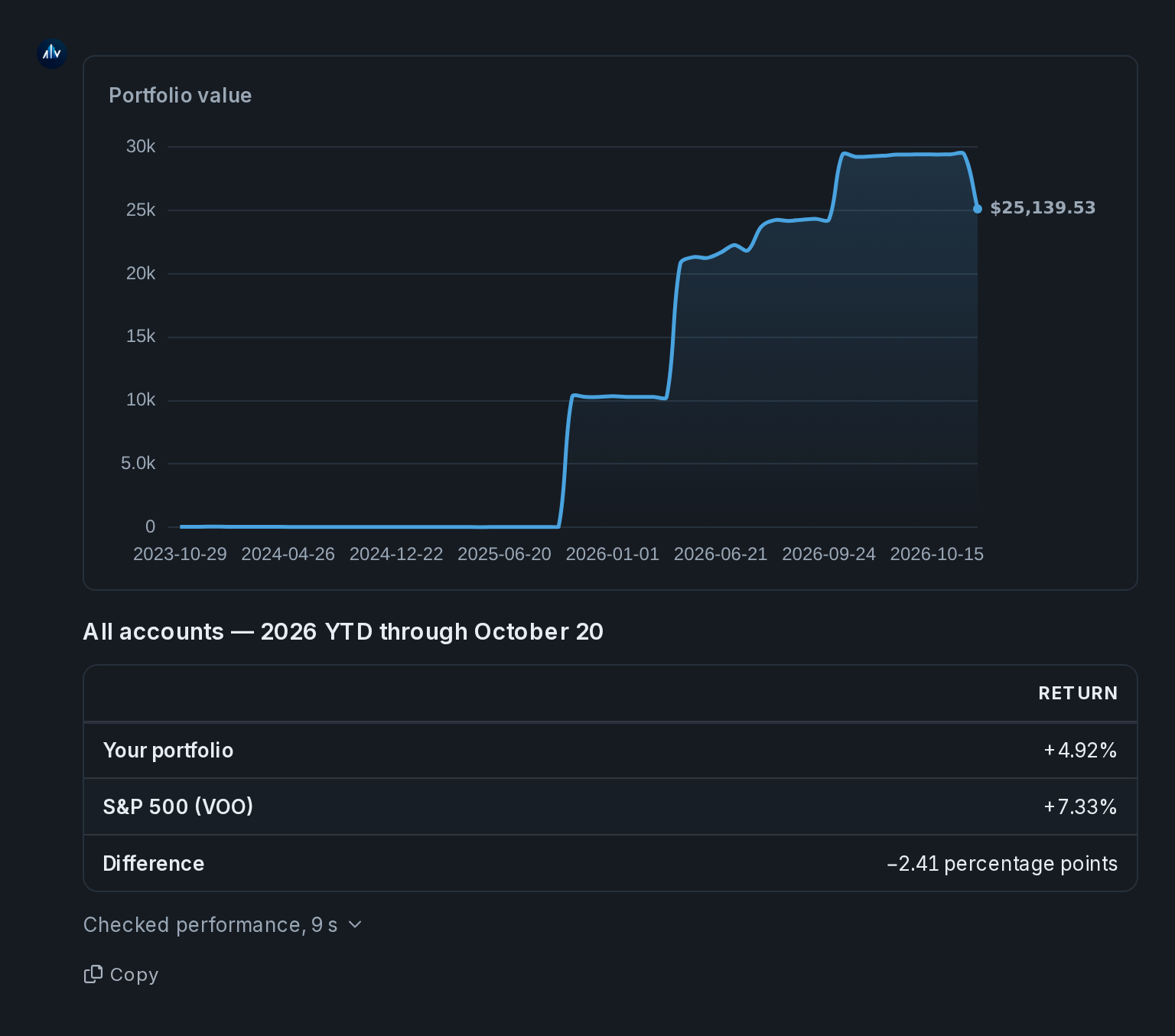
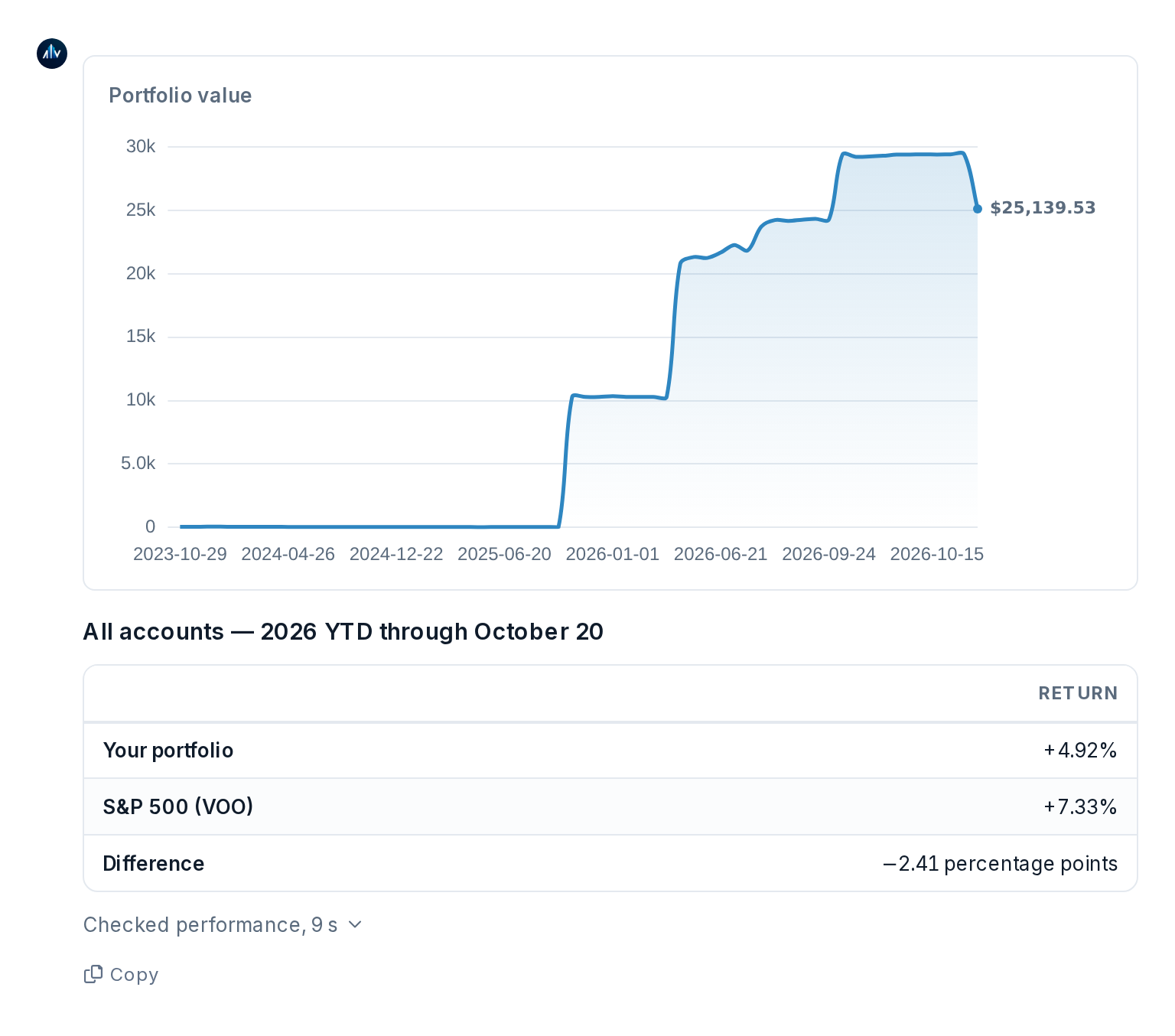
How has my portfolio done this year against the S&P 500? Just the numbers.
- The answer
- Up 4.92% this year to 20 October, against 7.33% for its S&P 500 benchmark (VOO): 2.41 points behind.
- How it got there
- Time-weighted return from the performance history, against the benchmark the portfolio is set to.
AllInvestView
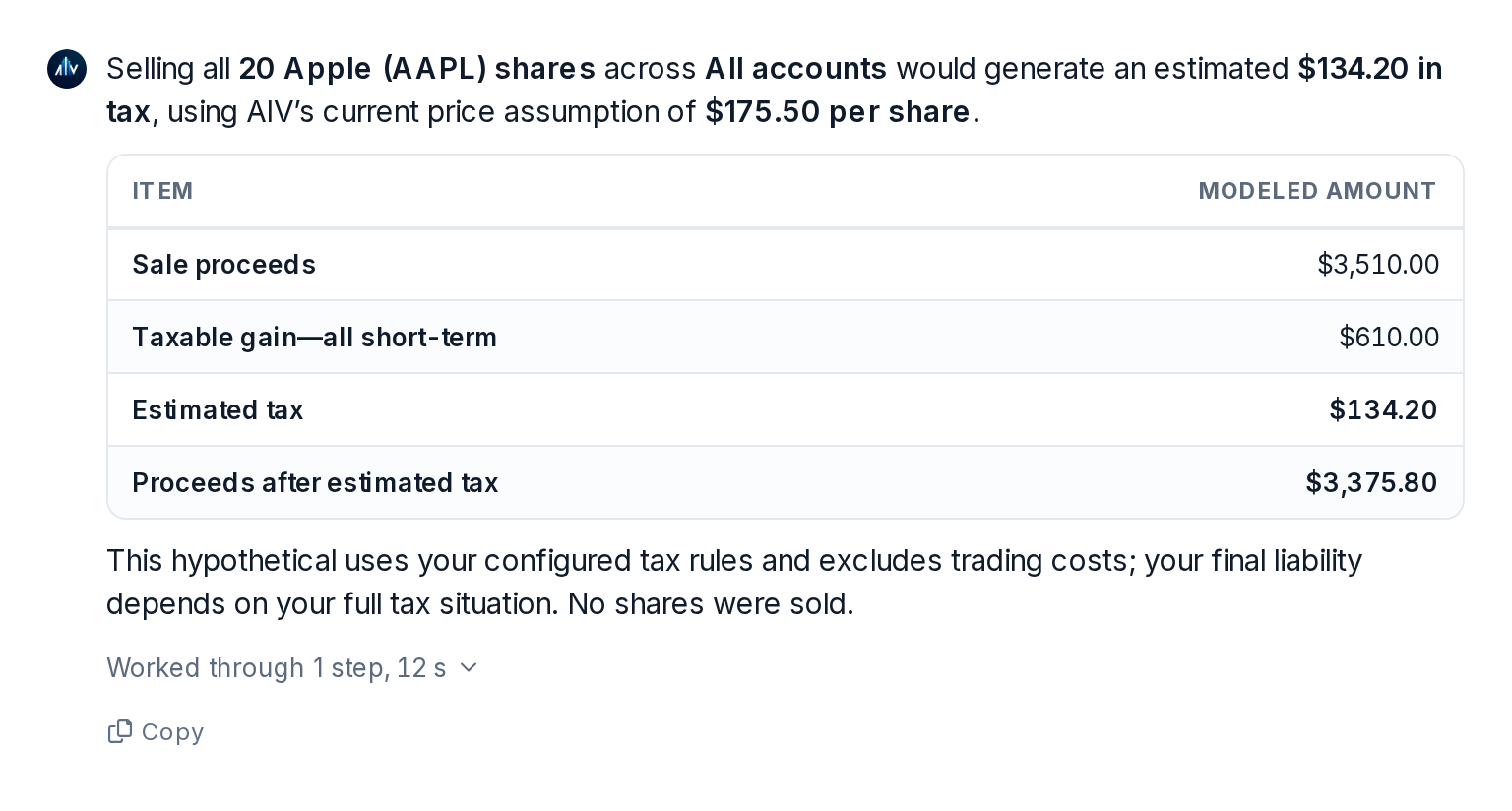
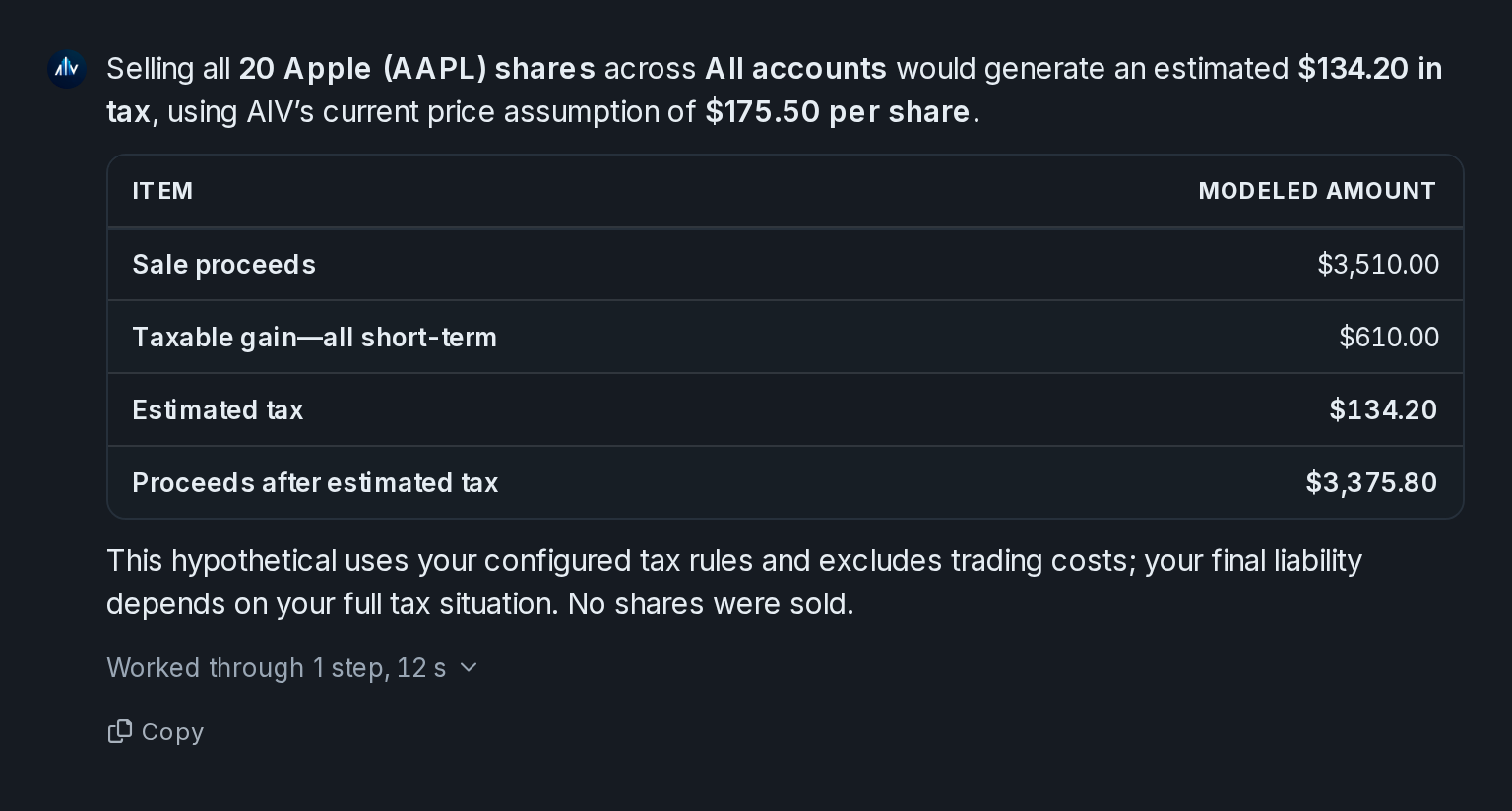
What tax would I owe if I sold all my Apple shares today?
- The answer
- $134.20 on a $610 short-term gain, from 20 shares at $175.50. Nothing was sold.
- How it got there
- The real purchase lots and the tax rules set on the account, the same ones the tax report uses.
AllInvestView
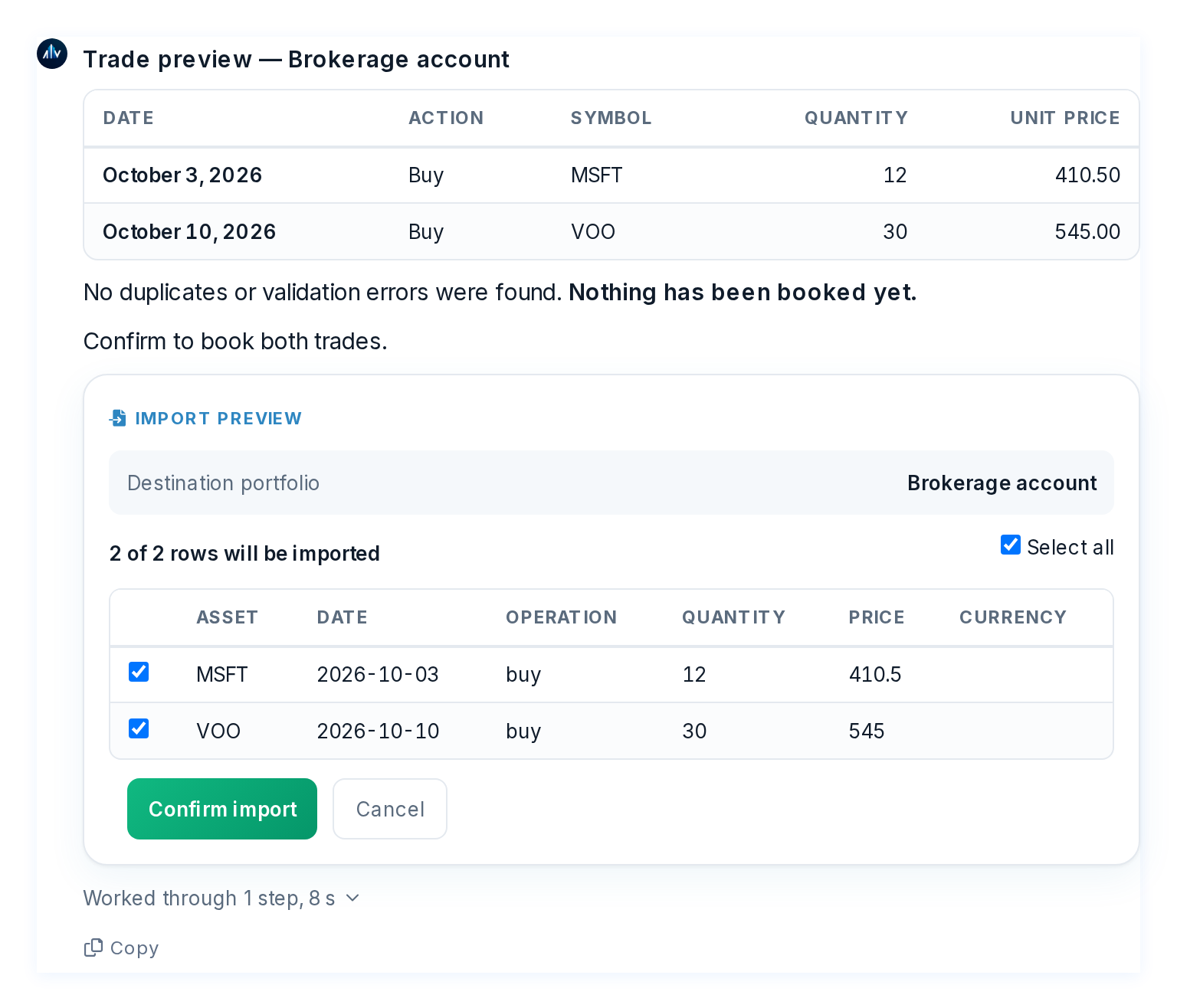
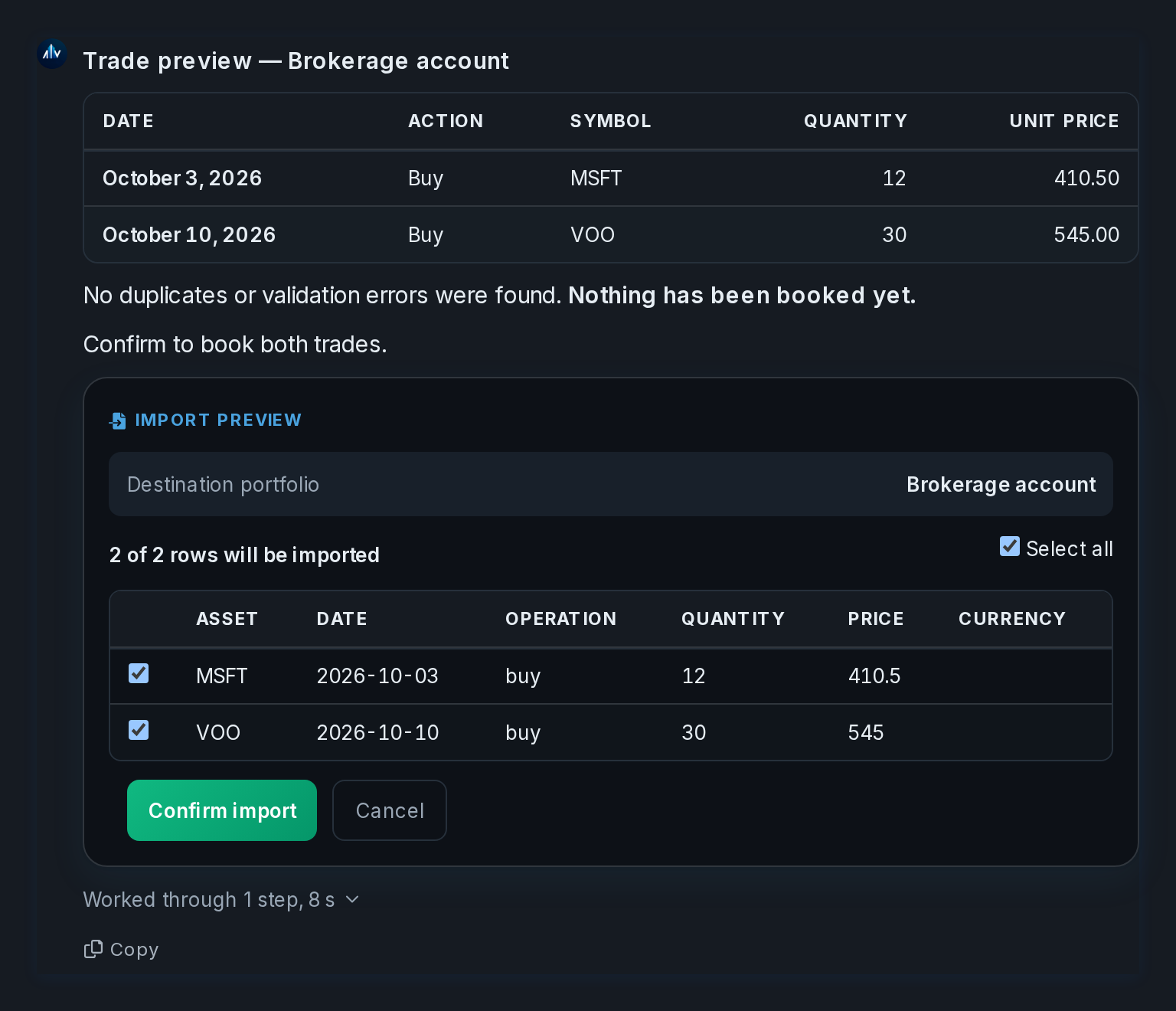
Book these: bought 12 MSFT at 410.50 on 3 October 2026 and 30 VOO at 545 on 10 October 2026.
- The answer
- Both trades laid out in a preview, checked for duplicates, with Confirm and Cancel buttons.
- How it got there
- The same importer as the Import page. Nothing is booked until you press Confirm.
AllInvestView
What else the AllInvestView assistant does
It works on the same records as the rest of the app: stocks, ETFs, funds, bonds, options, crypto and cash, across every broker.
- On every planThe free plan has the assistant with a monthly allowance. Starter gives five times as much, and Advanced and Pro more again.
- Files and screenshotsDrop in a broker CSV, an Excel sheet, a PDF statement or a screenshot of your positions, and it turns them into trades to check.
- Reconciles statementsGive it your broker’s statement and it shows what matches, what is missing and what differs, then offers to add or fix the rows.
- Bonds, options and taxOption premium and realized profit, bond pricing, dividends coming up and capital gains for your country are all things it can answer.
- Checks on a scheduleAsk it to tell you when tech tops 40% of your portfolio, and it checks daily or weekly and lets you know.
- What-ifs on your own moneySell one holding to buy another, or save more each month toward a goal, and see the result before anything changes.
Rather use ChatGPT or Claude?
On Pro, connect AllInvestView to the assistant you already use. It sees the same portfolio and makes only the changes you ask for. How to connect
Before you hand your portfolio to an AI
Four things decide whether its answers are worth acting on.
It has to see all of it
An AI that sees one broker can only answer for that broker, and one that sees holdings without the trades behind them can’t work out your return or the tax on a sale. Check that every account, sale and dividend gets in, from sync or from files.
Ask who does the math
A language model doing sums in its head can slip. The tools worth trusting work the numbers out in the tracker, or in code, and let the AI explain them, so the answer matches the dashboard.
Know what it can change
Read-only can’t break anything, but it can’t fix anything either. If the assistant can edit your records, check which changes wait for your OK and which ones you can undo.
Information or advice
PortfolioPilot and Magnifi give personal advice as registered advisers. Most trackers, AllInvestView included, give you the facts and the what-ifs, and leave the decision with you.
AI portfolio tracker questions
What is the best AI portfolio tracker?
For most investors with more than one account, AllInvestView: the assistant comes with the free plan, reads every portfolio you sync or import, answers from the same figures as your dashboard, and can book trades, set alerts and fix records when you ask. PortfolioPilot is the pick if you want personal advice from a registered adviser, and Snowball Analytics if dividend income is what you track most.
Can AI manage my investment portfolio?
AI can analyze your portfolio, explain what changed, estimate the tax on a sale and keep your records tidy. Most of these tools only read your broker accounts, and the decisions stay yours. If you want someone to run the money for you, that is a robo-adviser or a human adviser.
Is it safe to give an AI my portfolio data?
Look for read-only broker connections, a clear list of what the AI can read and change, and a way to cut access. Whatever you ask is sent to the AI provider behind the tool, so ask about your portfolio, not your passwords. In AllInvestView you can revoke the ChatGPT or Claude connection from your account page at any time.
Can ChatGPT analyze my stock portfolio?
Yes. US users can link accounts to Finances in ChatGPT, and anyone can upload a broker export for it to analyze. The answer is only as good as the export: a sale without its buy, or a missed currency, gives the wrong return. A tracker that keeps your full history and hands ChatGPT its own figures takes that step out.
Is there a free AI portfolio tracker?
Yes. AllInvestView includes its assistant on the free plan, for up to 10 holdings, and Snowball Analytics includes Ask on its free plan with lower limits. getquin, Delta and PortfolioPilot keep the AI, or most of it, for paid plans.
Can I use my AllInvestView portfolio inside ChatGPT or Claude?
Yes, on the Pro plan. Add AllInvestView as a connector in ChatGPT, Claude, Claude Code or Cursor, approve it once, and that assistant can read your holdings, performance, dividends and tax figures and make the changes you ask for.
Keep reading
The assistant is on the free plan, with your first 10 holdings. No card needed.
Competitor prices and features were checked on the vendors' own pages on 23 October 2026. This comparison is for information only and is not financial, tax or investment advice. © 2026 AllInvestView.