
Monarch Money$99.99 a year, or $14.99 a month
Budgets, bills and net worth for a whole household, on the web and your phone. Plus, at $199.99 a year, works out gains from what you paid.
Monarch alternatives Alternatives · prices checked 24 October 2026
The right one depends on what you use Quicken for. For budgets and bills, Monarch Money or YNAB. To pay once and keep your data on your own computer, Moneydance at $49.99 or GnuCash for free. On a Mac, Banktivity. For investments, with every lot, your dividends and a capital gains report across all your brokers, AllInvestView, free for 10 holdings.
Quicken has no free plan. Classic Deluxe is $6.99 a month and Premier $7.99, billed yearly at first-year prices, and the Schedule D report needs Premier on Windows.



Quicken does a lot in one place. Most replacements do one part of it better, so start with the part you'd miss.
If Quicken is where you plan spending and keep an eye on bills, these are the closest swaps. All three are subscriptions.
Budgets, bills and net worth for a whole household, on the web and your phone. Plus, at $199.99 a year, works out gains from what you paid.
Monarch alternatives
Give every dollar a job before you spend it. The trial runs 34 days, and investments sit in tracking accounts outside the budget.

Quicken's own lighter app for the web and phone. It connects US and Canadian accounts, one currency at a time.
Simplifi alternativesQuicken Classic is a yearly subscription now. These run on your own computer without one, and all three open Quicken files.
Windows, Mac and Linux, with the next major version included. It imports Quicken QIF files and keeps investment lots, FIFO or average cost.
Double-entry books for your own money on Windows, Mac and Linux. It imports QIF and matches each sale to the lots it came from.

A one-time license for the 2027 edition on Windows, Mac and Linux, with phone apps. Bank downloads and quotes run for the first year, then come with the next upgrade.
Quicken runs on a Mac, but these two were made for Apple devices from the start.

Mac, iPhone and iPad. From the Silver plan it tracks investments with cost basis and gains, and you pick the lots when you sell. It imports Quicken files.

A polished budgeting app for Mac, iPhone, iPad and the web, with your investments measured against benchmarks.
Copilot alternativesIf the investing side is what keeps you in Quicken Premier, these take it further.
Every lot at its own cost, dividends from all your brokers, your return for any dates and a capital gains report. Form 8949 and Schedule D come with paid plans.
See it below
Net worth, holdings and allocation across your linked accounts, with a retirement planner.
Empower alternatives
One net worth for stocks, crypto, property and private investments, held in any country.
Kubera alternativesUS prices. "Billed yearly" is the monthly price when you pay for the year up front.
| Tool | Best for | Price | Pay once | Runs on | Investments |
|---|---|---|---|---|---|
AllInvestView |
Investments, dividends and tax | Free for 10 holdings; $6.99 a month, billed yearly | Lifetime plan, $497, for a limited time | Web, iPhone, Android | Every lot kept; FIFO, LIFO, HIFO or average cost; capital gains report |
Quicken Classic |
Budgets, bills and investments | Deluxe $6.99, Premier $7.99 a month, billed yearly | No | Windows, Mac | Lots, FIFO or chosen lots; Schedule D report on Premier for Windows |
Quicken Simplifi |
Spending and budgets | $3.99 a month the first year, $6.99 standard | No | Web, iPhone, Android | Holdings, balances and performance |
Monarch Money |
Household budgets | $99.99 a year | No | Web, iPhone, Android | Holdings and allocation; gains from cost on Plus |
YNAB |
Zero-based budgeting | $109 a year | No | Web, iPhone, Android | Account balances you update |
Copilot Money |
Budgets on Apple devices | $95 a year | No | Mac, iPhone, iPad, web | Values against benchmarks; no tax documents |
Empower Personal Dashboard |
Net worth and retirement | Free | Free | Web, iPhone, Android | Holdings, allocation, retirement planner |
Moneydance |
Desktop finances | $49.99 | Yes | Windows, Mac, Linux | Lots with FIFO or average cost |
Banktivity |
Finances on a Mac | From $6.99 a month | No | Mac, iPhone, iPad | Cost basis and chosen lots, from Silver |
GnuCash |
Double-entry books | Free | Free, open source | Windows, Mac, Linux | Lots, with sales matched FIFO |
Moneyspire |
Desktop finances | $59.99, list price $99.99 | Yes | Windows, Mac, Linux | Buys, sells, dividends and fees |
 Tiller |
Finances in a spreadsheet | $99 a year | No | Google Sheets, Excel | Holdings and cost basis in a beta, Google Sheets only |
Kubera |
Net worth across everything | $250 a year | No | Web, iPhone, Android | Stocks, crypto and property, with IRR |
For the two side by side, feature by feature, read Quicken vs AllInvestView. For budgeting apps after Mint, see Mint alternatives.
Monthly prices, billed yearly. The lower price is for your first year; renewals are at whatever Quicken charges then.
There's also Classic Starter at $4.49 a month, without investment tracking. None of the plans has a free trial; Quicken offers a 30-day money-back guarantee.
Where each feature sits in Quicken Classic, from Quicken's own help pages, and what you get for the same job in AllInvestView.
Quicken ClassicAllInvestViewQuicken does more than investments: budgets, bills and bank downloads stay its home ground, and AllInvestView doesn't replace them.
Your trades usually live in two places, Quicken and the broker. The broker's copy is the cleaner one to bring.
Broker sync brings in holdings and trade history wherever the broker provides it, then keeps them up to date. It comes with paid plans.
Download your history from the broker as CSV or Excel and upload it as it is. AllInvestView reads the columns, shows you every trade it found, and books them once you confirm.
For accounts the broker no longer shows, export Quicken's Investment Transactions report and attach it to a support ticket. A person maps it to your portfolio with you.
If you stop paying for Quicken ClassicSimplifi works differently: without an active plan you can't see your data, so export it before the plan ends.
MoneydanceQIFBanktivityQIF and QMTFGnuCashQIFMoneyspireQIF and QMTFMonarchtransactions from a CSVLots don't always come across exactly, so check each account's holdings and cost after an import.
Capital gains, Form 8949 and dividends, across every broker you use.
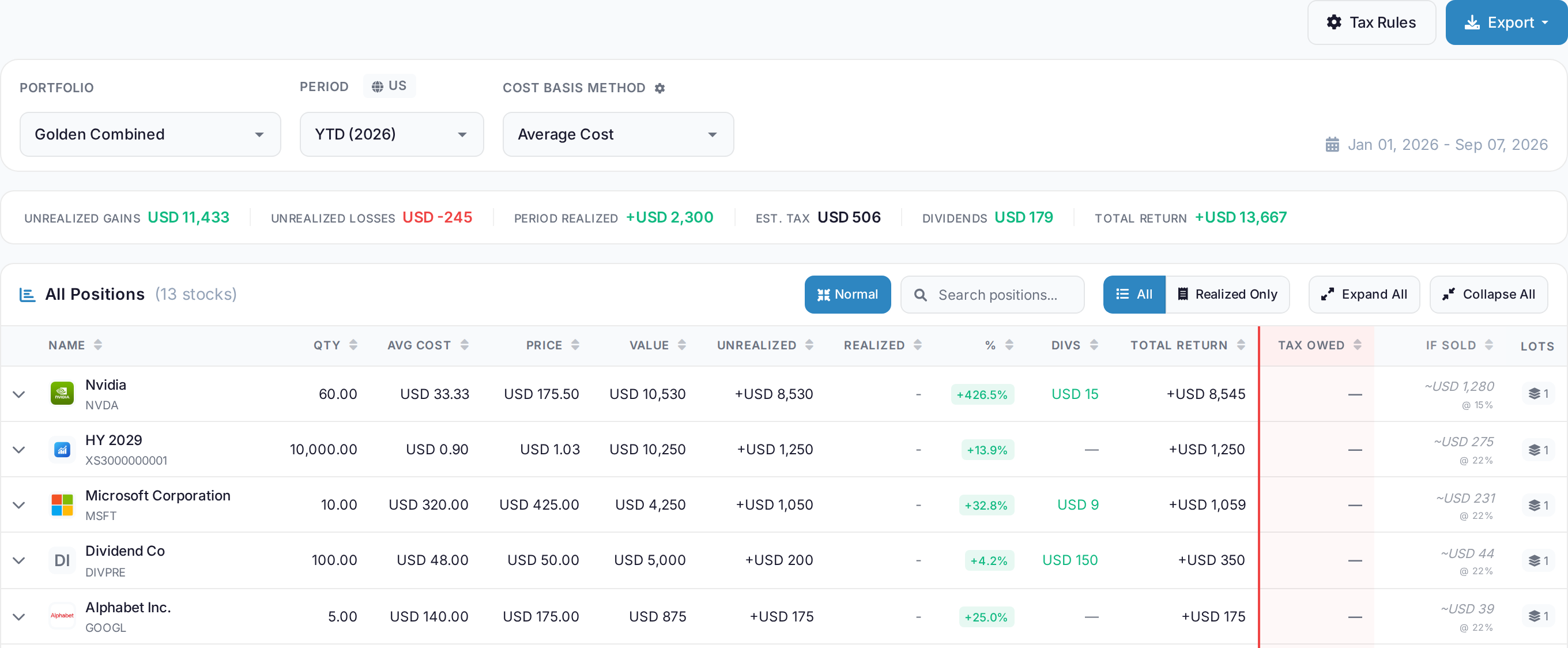
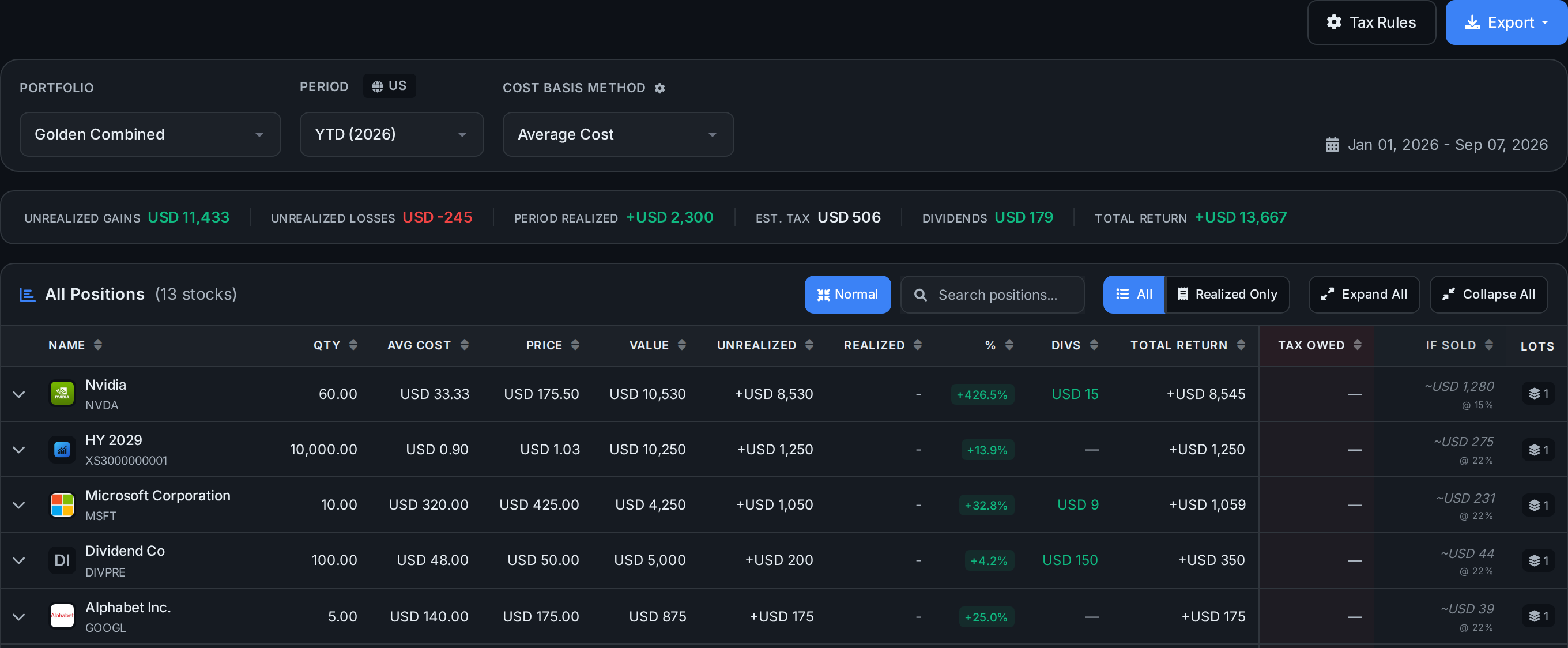
Realized and unrealized gains, the tax they carry and what you'd owe if you sold today, worked out lot by lot from every account. Switch between FIFO, LIFO, HIFO and average cost and the report follows.
See the US tax reportAllInvestView
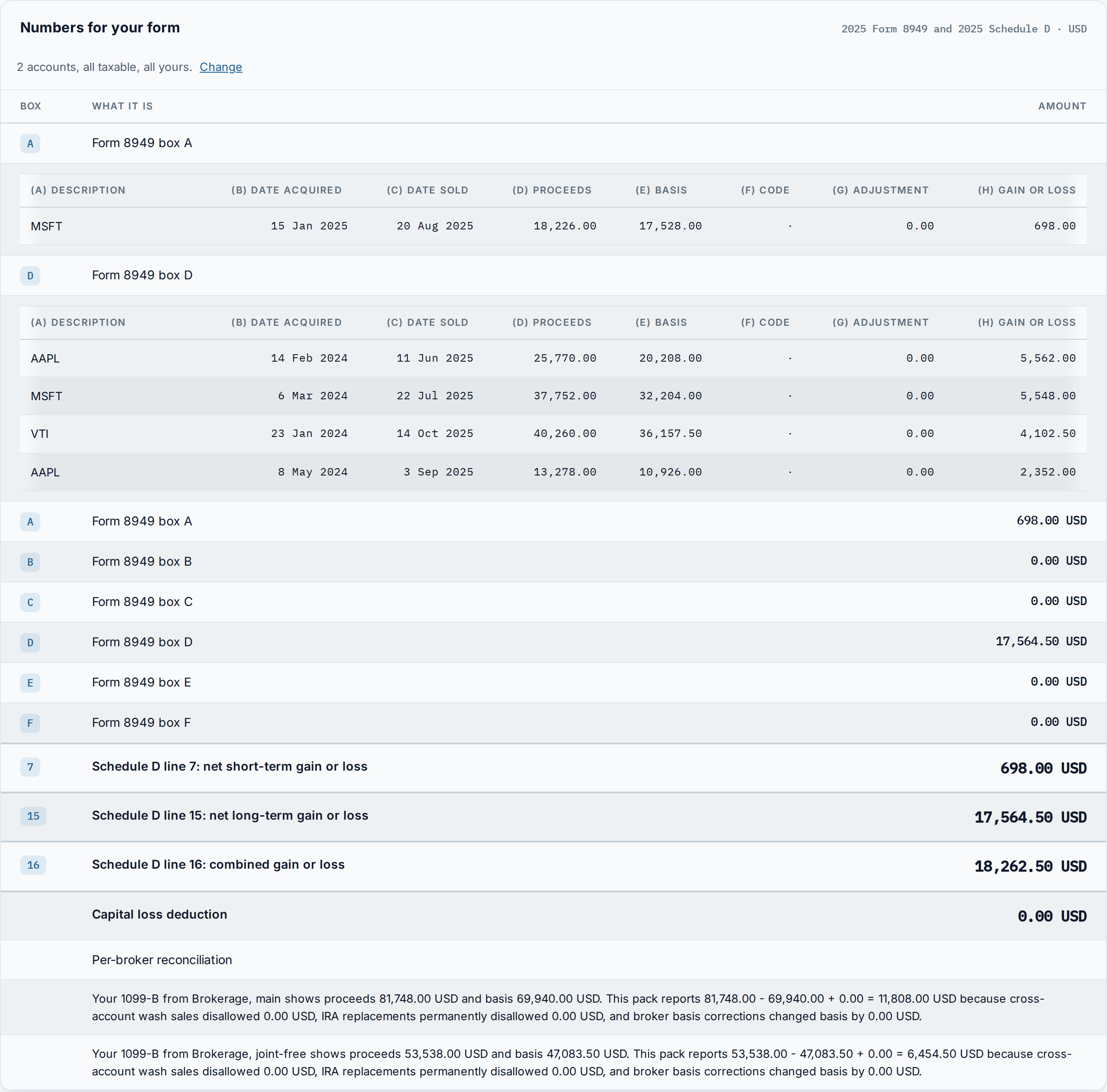
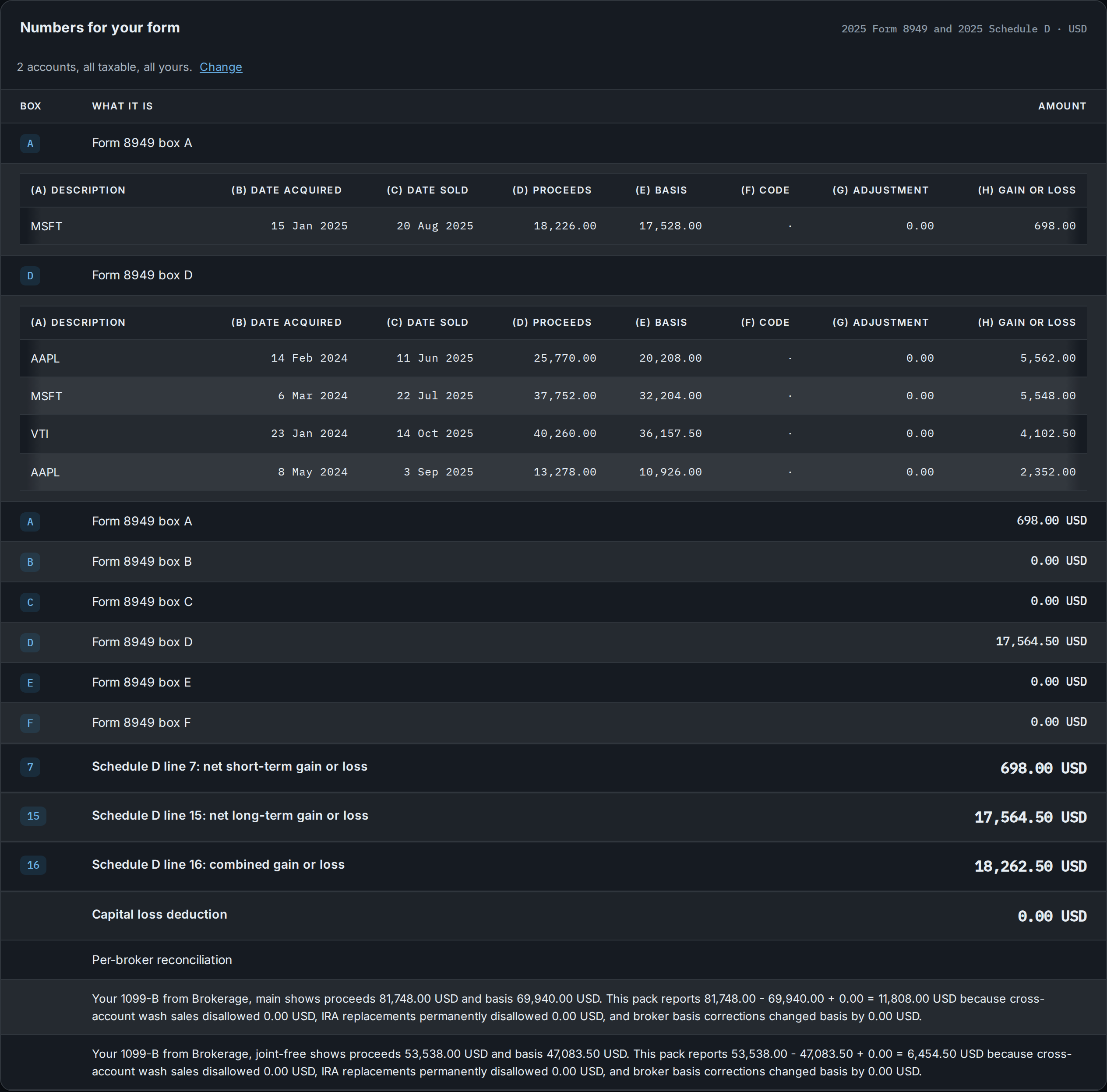
Each sale lands on the right Form 8949 box with columns (a) to (h), the totals carry to Schedule D lines 7, 15 and 16, and each broker's totals are there to match against its 1099-B. Export it as PDF, Excel or CSV for you or your accountant.
See how Form 8949 is builtAllInvestView
Dividends from all your accounts in one report: gross, tax withheld and net where those are known, your biggest payers and how fast they've grown, and the next 12 months projected from each payer's history.
See the dividend trackerAllInvestView
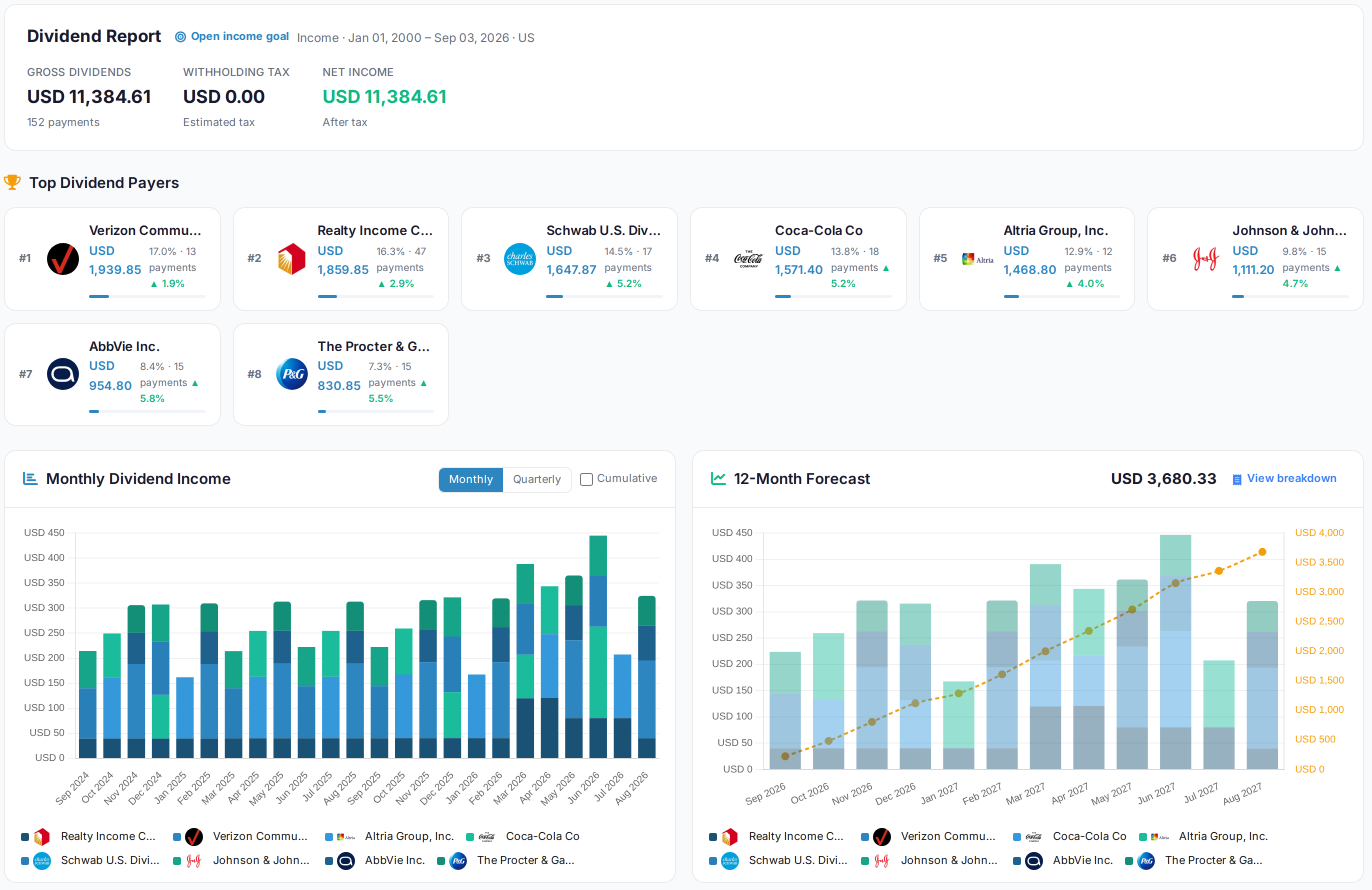
Connect your brokers or upload their history. AllInvestView keeps each lot at its cost, tracks the dividends, shows your return for any dates and works out the capital gains tax. Quicken can keep the bills.
GnuCash, if you want full books for your money on your own computer: it's free and open source. Empower Personal Dashboard is free for net worth across linked accounts. For investments, AllInvestView is free for one portfolio of 10 holdings, with every lot, your dividends and a capital gains report.
No. Quicken Classic and Simplifi are paid plans billed once a year, and there's no free trial. Quicken gives a 30-day money-back guarantee instead.
With Classic Deluxe or above, your file stays yours: you can still open it, edit it and export it. Downloads from your bank, price quotes, mobile sync and support stop. Starter is more limited, and Simplifi needs an active plan even to look at your data.
Not from Quicken. Classic is sold only as a subscription now, and Quicken 2017 and older are no longer supported. To pay once, Moneydance costs $49.99, Moneyspire $59.99, and GnuCash nothing.
Moneydance, Banktivity, GnuCash and Moneyspire import the QIF file Quicken for Windows exports. Monarch takes your transactions from a CSV. Investment lots don't always come across exactly, so check each account's holdings and cost after the import.
AllInvestView, if investments are the part you care about. It keeps every lot from every broker, tracks dividends, shows your return for any dates and produces a capital gains report, with Form 8949 and Schedule D on paid plans. Quicken can stay for budgets and bills if you like it there.
Checked on 24 October 2026.
Prices are in US dollars before tax and can differ in other countries and in the app stores. Features and prices change; each vendor's own page is the final word.