DivTracker and AllInvestView
Both keep the dividend calendar and income record. The difference is what the same history can do elsewhere in the portfolio.
DivTracker
Dividend-focused app with an iOS app and a web dashboard, built around the ex-dividend calendar and forward income estimates.

AllInvestView
FeaturedFull portfolio platform with dividend tracking plus bonds, options, tax reporting, and broker sync capabilities.
DivTracker features
DivTracker earned its following by doing one thing and doing it well: tracking dividend payments.
DivTracker Positives
- Clean mobile interface optimized for dividend viewing
- Payment calendar with upcoming dividends
- Monthly and annual income projections
- Yield on cost calculations
- Dividend growth tracking
- Simple, focused feature set
DivTracker Limitations
- Brokerage linking covers United States accounts only
- Free tier stops at 1 portfolio and 10 holdings
- Coverage is listed equities on US, LSE, TSX and ASX
- No tax reports
- Bonds and options are outside its scope
AllInvestView features
AllInvestView keeps the dividend calendar, forecast, payer history and yield figures beside the rest of the account.
Dividend-Specific Capabilities
- Dividend calendar: Upcoming income arranged by pay day, ex-date and projected amount
- Income projections: Forward-looking estimates based on current holdings and historical payment patterns
- Yield analysis: Current yield, yield on cost, dividend growth rates, and payout ratio data
- Dividend history: Complete payment records with source attribution and currency handling
- Reinvestment tracking: DRIP support with proper cost basis adjustment for tax purposes
- Withholding tax: Track foreign withholding taxes for international dividend stocks
Additional Features Dividend Investors Use
- Bond coupons: Fixed income investors get coupon schedule tracking alongside dividends
- Tax reporting: Dividend withholding breakdowns plus capital gains rules for fourteen countries
- Performance analysis: Total return calculations including reinvested dividends
- Broker sync: Direct broker connections automatically import dividend payments
- File import: Broker CSV exports retain dividend transactions
Income from multiple sources: If you earn income from dividends, bond coupons, and covered calls, AllInvestView tracks all three in one place. DivTracker handles only the dividends.
Dividend Tracking Specifics
Calendar view showing upcoming payments organized by date, with a clean mobile interface designed for quick checking.
Calendar view plus tabular listings with filtering. Dividends sit alongside bond coupons and option expirations for a complete income picture.
Projects future dividend income from current holdings, with monthly and annual estimates.
Projects dividend income plus bond coupon payments, and factors in expected dividend increases based on historical growth patterns.
Current yield and yield on cost are calculated on both. AllInvestView adds dividend coverage ratio analysis where data permits.
Basic DRIP tracking.
DRIP tracking with automatic cost basis adjustment, which matters for the tax calculation when the reinvested shares are eventually sold.
Beyond Dividend Tracking
Most dividend investors hold more than just dividend stocks. Here's where platforms diverge significantly.
Bonds cannot be recorded.
Full bond analytics: coupon schedules, yield-to-maturity, duration calculations and accrued interest tracking.
Options positions cannot be recorded.
Complete options tracking with Greeks (Delta, Gamma, Theta, Vega), useful for dividend investors selling covered calls to enhance income.
Publishes total return and a comparison against the S&P 500.
Time-weighted returns, money-weighted returns (XIRR) and benchmark comparisons.
Getting Data In
Every tier, including Free, supports manual entry, CSV files and read-only brokerage links. The links cover United States brokerages. Other accounts need a file.
- Direct broker sync: Payments from supported linked accounts become part of the dividend record automatically.
- Flexible files: Complete transaction history can come from CSV, XLSX or copied rows without a prescribed layout
- Recognized exports: Files from more than 50 brokers retain dividend payments
- Records outside those sources: Custom dividends can cover missing payments
Automatic dividend capture: With direct broker sync, dividend payments appear in AllInvestView automatically. No manual tracking required for supported brokers.
Tax Considerations
Shows dividend income totals, without detailed tax reporting or withholding analysis.
- Dividend income reports: Annual summaries broken down by holding and payment date
- Withholding tax tracking: Foreign tax paid on international dividends
- Gross vs net analysis: See pre-tax and post-tax dividend amounts
- Capital gains on DRIP shares: Proper cost basis tracking when selling reinvested shares
- Multi-jurisdiction support: Capital gains rules for fourteen countries
- Qualified vs ordinary: Classification where applicable for US tax purposes
Inside AllInvestView
Expected dividend payments
divtracker.app includes its Ex-Dividend Calendar on all three tiers, including Free. AllInvestView also shows upcoming income.
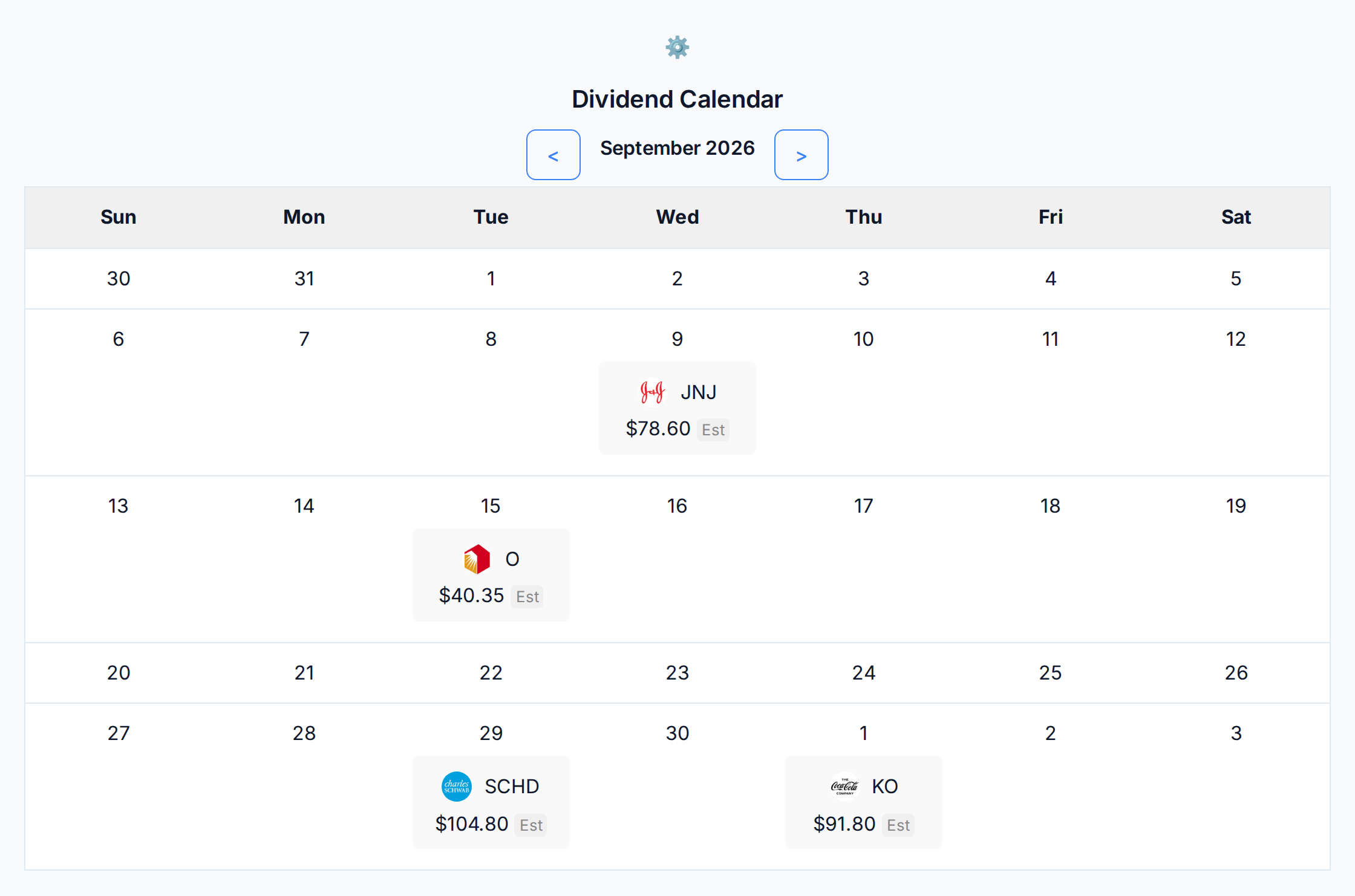
AllInvestView also puts expected payments on their pay dates. On this demo portfolio, the September 2026 calendar has four scheduled amounts: 78.60 for JNJ, 40.35 for O, 104.80 for SCHD and 91.80 for KO. Each payment appears on its pay date. Unannounced amounts remain estimates, so a future raise or cut does not enter the monthly total as a fact.
The calendar belongs to the same portfolio as the holdings, allocation and return, keeping each payment beside the position that produces it.
 AllInvestView
Gross income, tax and net income
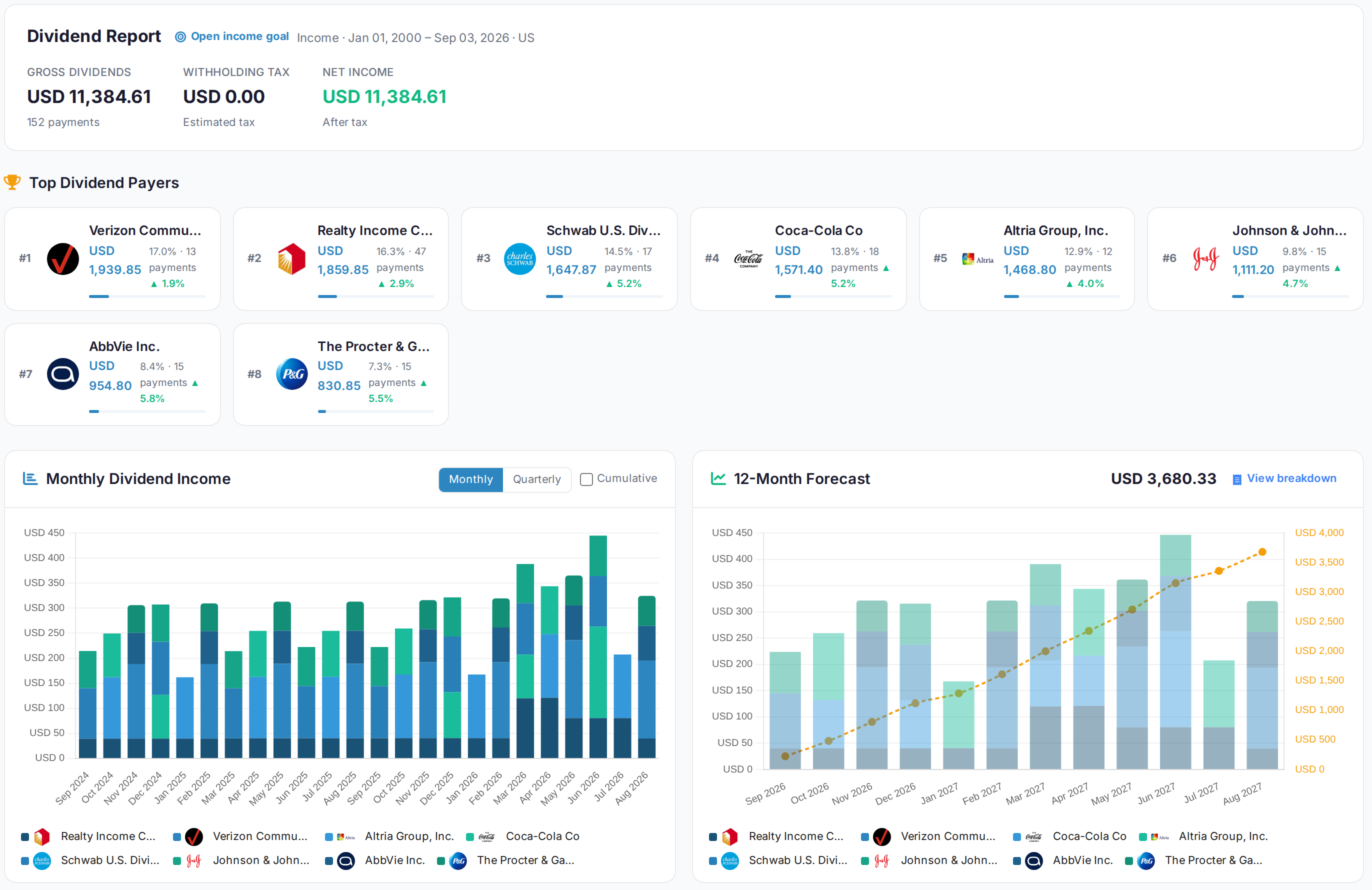
divtracker.app forecasts income and puts an estimate on the months ahead. AllInvestView also turns the payment stream into a report you can share at the end of the year.
The report splits 152 payments three ways: what was declared, what was taken at source, and what actually reached the account. It then lists the top payers and their growth rates. Monthly history is split by payer. The next twelve months are projected at 3,680.33 USD. The product assigns a forecast method to each payment and labels the method it used.
The report keeps withholding separate. Tax deducted at source does not reach your account. This means gross and net yield are different, and the report shows both.
 AllInvestView
Return measured between two dates you choose
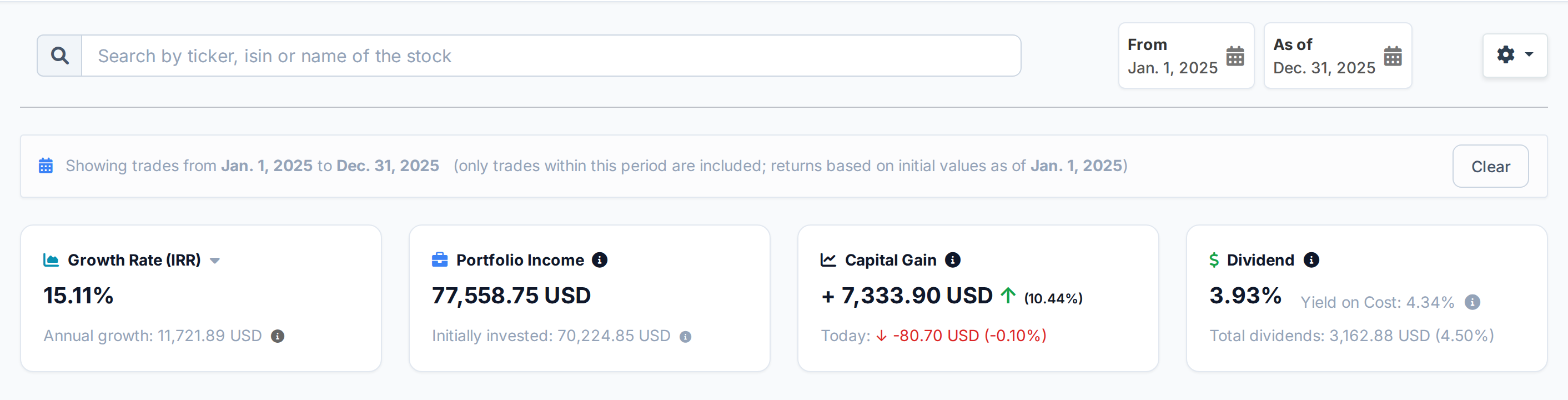
divtracker.app shows total return and sets it against the S&P 500. AllInvestView also gives you a headline return for any period.
Choose any date range and the dashboard recalculates the money-weighted return, capital gain and yield. The 2025 calendar year comes back at 15.11%, with a gain of 7,333.90 USD and a yield of 3.93%, with no results from 2024 or 2026 mixed in.
You can compare two calendar years or start on the day you opened a position. That shows how the position performed during the period you care about.
 AllInvestView
Capital gains and dividend tax
All three divtracker.app tiers include links for United States brokerages, CSV export, an ex-dividend calendar and income forecasts. Free, Pro and Ultimate have different portfolio and holding caps. The product does not provide tax reports.
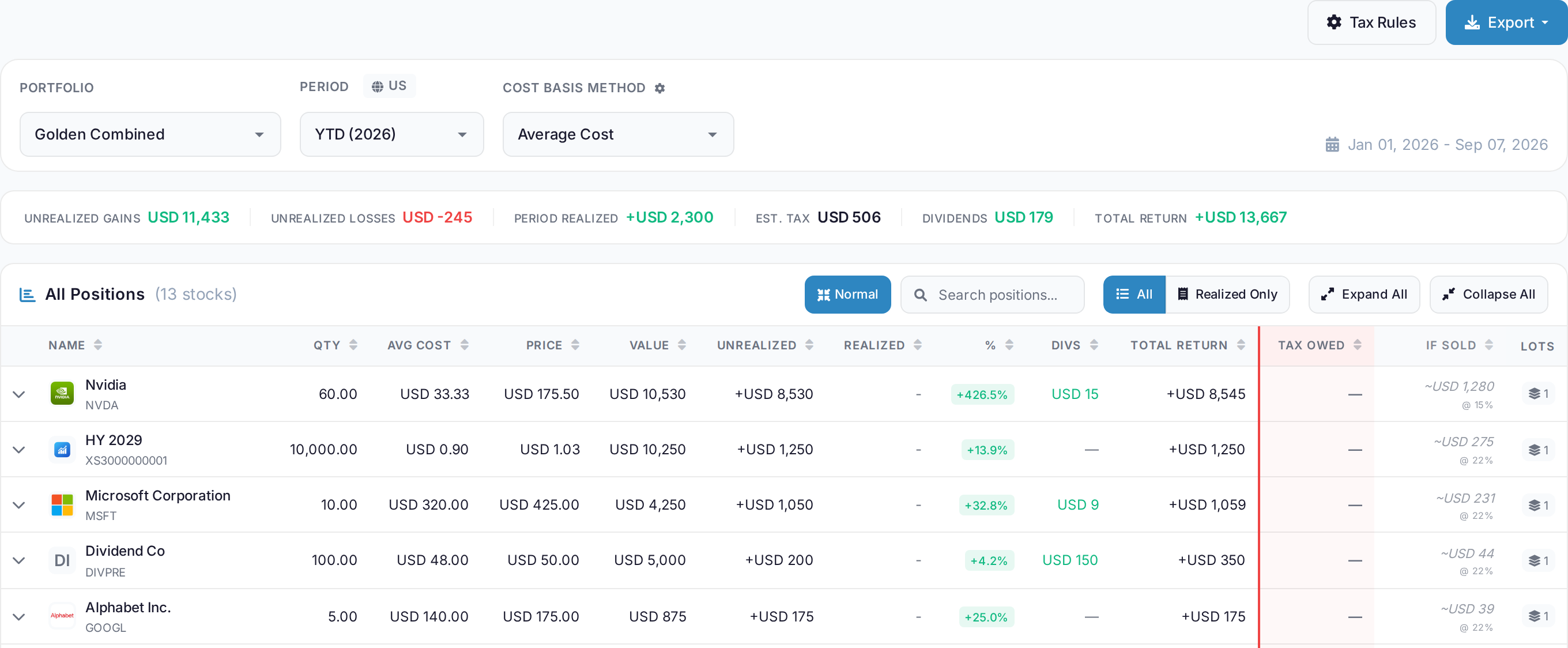
The report calculates a portfolio and period under one country, shown here under US rules. Closed disposals feed the realised totals. For every open position, If sold puts a price on selling today and Tax Owed shows a dash. Fourteen countries ship with their own capital gains rules. The same disposals can be checked under average cost, FIFO, HIFO and LIFO. The report shows the tax from each method.
Dividend income is only part of a tax year. The report also covers disposals, then exports to PDF, Excel or CSV.
 AllInvestView
Importing your history
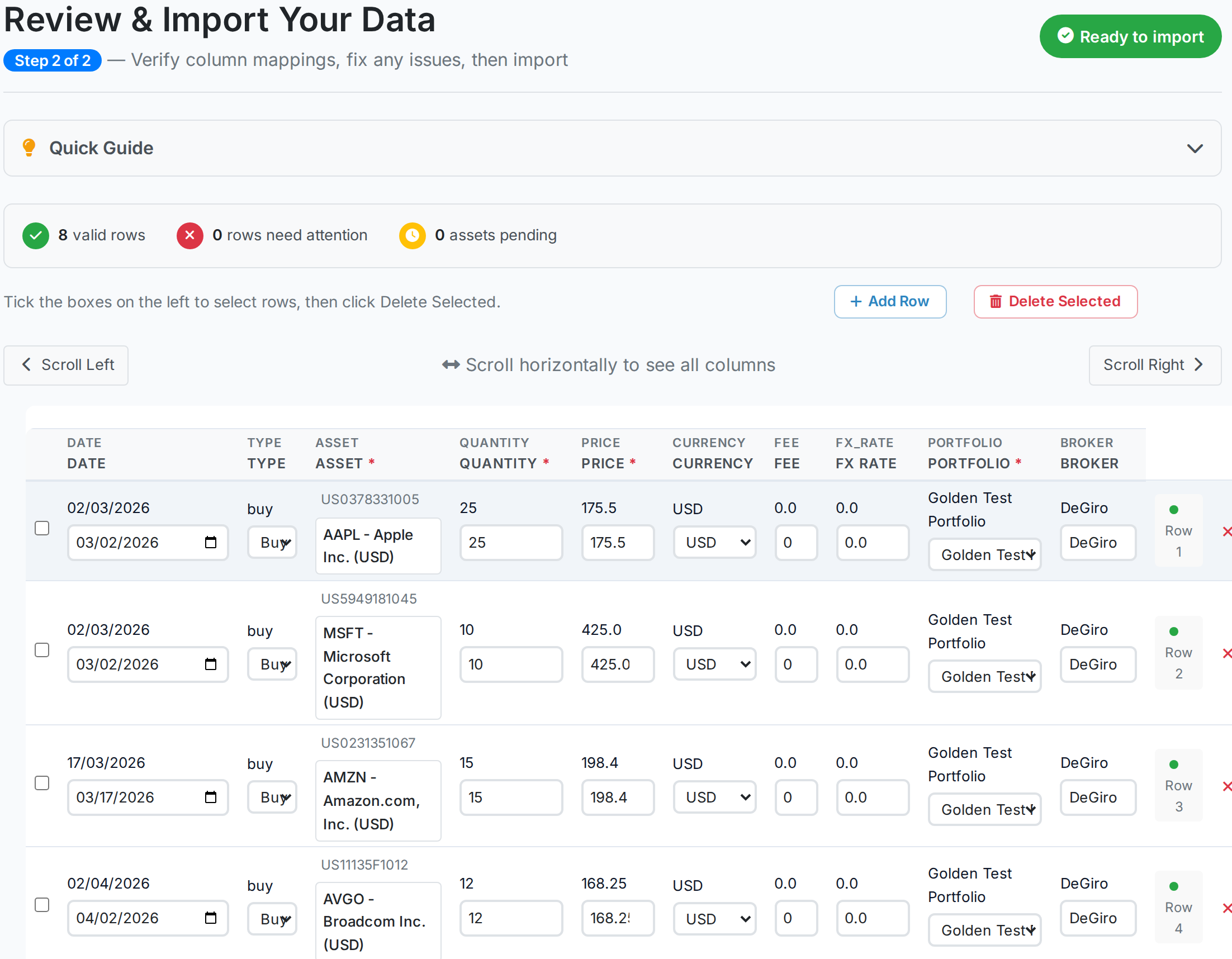
divtracker.app connects United States brokerages on every tier, including Free. Accounts at German, Dutch or British brokers usually move by file instead.
CSV, XLSX and pasted spreadsheet rows bring history across from any column layout. The sample European broker export in the capture has foreign-language headings and semicolons in place of commas, with eight valid rows and every instrument identified from its ISIN.
Direct broker sync covers brokers well outside the United States and keeps updating after the first load. Statement history can also be reconciled against the recorded trades. Linked accounts are compared on current positions.
 AllInvestView
The companies inside your income ETFs
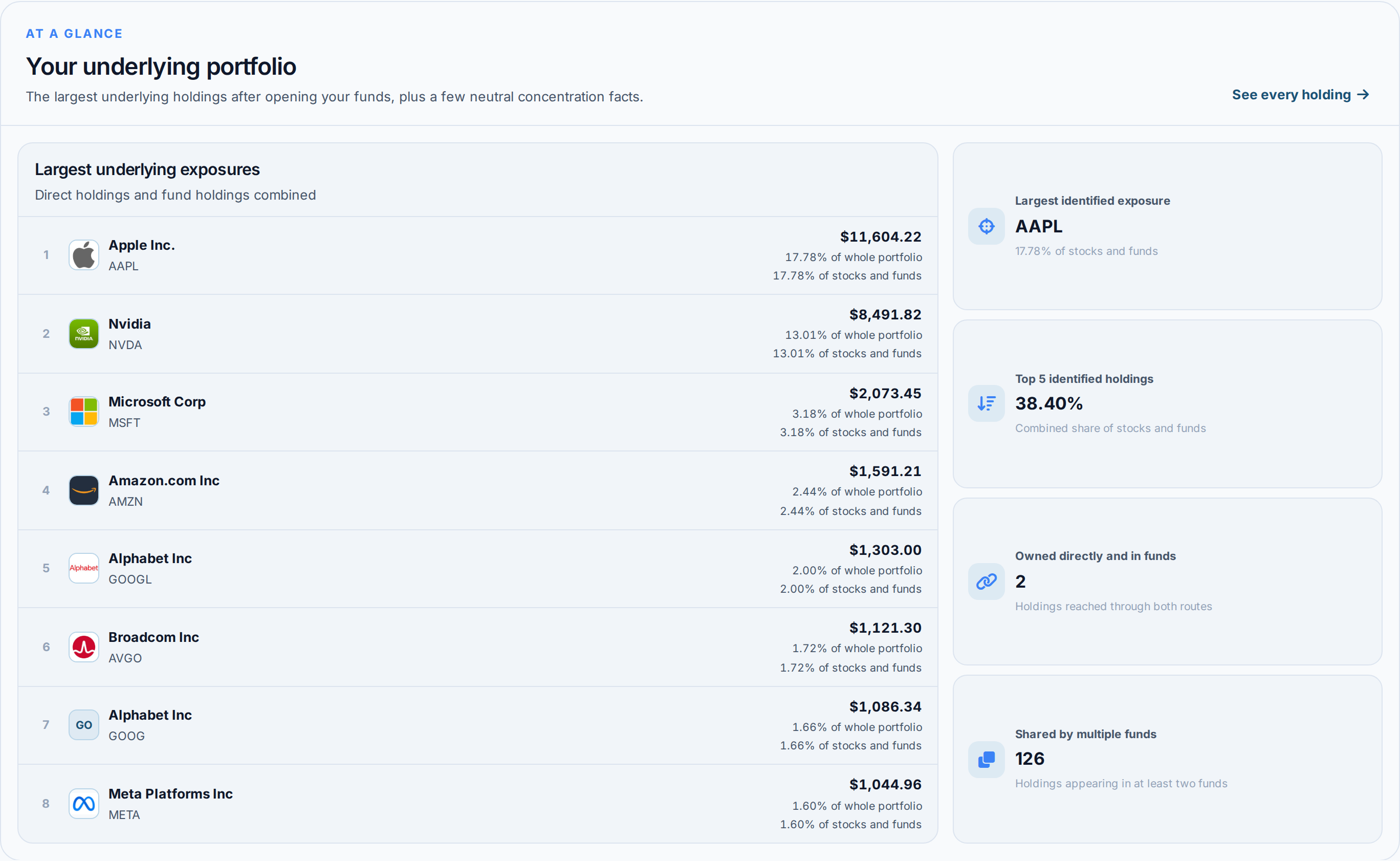
An income portfolio leaning on SCHD, VYM and a sector fund or two may look like a short list of tickers. Each fund can hold many companies. A quarterly payment is recorded against the fund, not those underlying companies.
Portfolio X-Ray opens the funds and combines what is inside them with what is held directly. The example combines SPY, QQQ and SCHD alongside AAPL and NVDA. It shows the largest underlying companies and the share held by the top five. It also finds direct and fund exposure to the same company. In this example, 126 companies appear in at least two funds.
Three funds bought for diversification can still rely on the same twenty companies. A dividend cut in one sector can therefore affect more of the portfolio than the ticker list suggests.
 AllInvestView
Feature Grid
| Capability | DivTracker | AllInvestView |
|---|---|---|
| Dividend payment tracking | ||
| Dividend calendar | ||
| Income projections | ||
| Yield on cost | ||
| DRIP tracking | ||
| Withholding tax tracking | ||
| Direct broker sync | US only | |
| Import reads any column layout | ||
| Bond coupon tracking | ||
| Options tracking | ||
| Portfolio performance | ||
| Tax reporting | ||
| Web access | ||
| Native mobile app | ||
| Lifetime pricing option |
Pricing Structures
DivTracker: Free for 1 portfolio and 10 holdings. Pro is $4.99 a month or $29.99 a year, Ultimate $6.99 a month or $49.99 a year, both lifting the caps.
AllInvestView: Free trial available. Paid subscriptions monthly or yearly. Lifetime deal option eliminates recurring payments.
AllInvestView covers upcoming payments, payer history, growth rates and forecasts. It also shows performance for chosen dates and exposure inside funds. Tax, bonds and options stay in the same portfolio.
Put Dividend Income in the Complete Portfolio
Dividends, bond coupons, covered call premiums–see your complete income picture with automatic broker sync and tax reporting.
Which dividend tracker to choose
AllInvestView covers the same dividend work. Its report and calendar show upcoming payments, full history, growth by payer, forecasts and withholding.
It then measures any date range, opens the companies inside income funds and carries the reconciled trades into country-specific tax reports. Bonds, covered calls and other holdings join the same income and net-worth record.
DivTracker keeps a focused dividend view through its calendar, income projections and yield figures.
Questions Answered
Which tracks dividends better?
Both have dividend calendars, payment history and forecasts. AllInvestView also shows growth by payer, returns between two dates and withholding. The same history is used in tax reports and the rest of the portfolio.
Does AllInvestView show dividend calendars?
Yes. AllInvestView includes dividend calendar views showing payment dates, ex-dividend dates and expected amounts. It also shows bond coupons on the same calendar.
Can I track foreign dividend withholding taxes?
AllInvestView tracks withholding taxes on international dividends and includes them in tax reports. DivTracker has limited tax functionality.
Which app works on desktop computers?
Both do. AllInvestView works in a web browser on desktop, laptop, tablet or phone, and has native iOS and Android apps. DivTracker has an iOS app and a web dashboard.
Do dividends import automatically?
In both, if the brokerage is connected. AllInvestView imports dividends through direct broker connections. DivTracker links United States brokerages; outside the US its transactions come from a file or by hand.
I sell covered calls. Which tracks that income?
AllInvestView tracks covered calls with current Greeks. DivTracker does not support options, so covered call income cannot be tracked there.