How the Products Differ
Portfolio Performance stores the portfolio locally. AllInvestView keeps one account available on the web and mobile apps.
Portfolio Performance
Open-source desktop application for Windows, Mac and Linux, with the portfolio held in a local file.

AllInvestView
FeaturedManaged web and mobile tracker with broker sync, file import and automatic updates.
What Portfolio Performance Offers
Portfolio Performance (often abbreviated PP) emerged from the German-speaking investment community and maintains a dedicated following among technically inclined investors.
Portfolio Performance Strengths
- Completely free with open-source code
- Data stays on your computer–total privacy
- Extremely customizable for power users
- Cost basis selectable between FIFO and Moving Average
- Active community and regular updates
- Works offline once installed
Portfolio Performance Drawbacks
- Bonds are quoted 0-100% with no yield to maturity or spread
- Steep learning curve for new users
- The portfolio lives in a desktop application; phone use means the separate companion app
- Manual price updates or complex setup for automation
- No broker sync–all imports manual
- Interface feels dated compared to modern apps
- Backup management falls on the user
What AllInvestView Adds
AllInvestView runs the service, updates and backups, while keeping the portfolio available across devices.
Access, Imports and Updates
- Instant access: No software installation, runtime or configuration files are required.
- Device flexibility: The same account and data are available on phones, tablets and computers.
- Flexible imports: Unfamiliar CSV, XLSX and copied spreadsheet layouts can preserve the full transaction record.
- Live broker connections: Direct sync pulls holdings from Interactive Brokers, Schwab, Fidelity, Public, Wealthsimple, and others. Positions update nightly.
- Automatic maintenance: Price data updates automatically. New features appear without manual software updates. Backups happen transparently.
- Account assistant: Portfolio questions and file reconciliation are built into the account.
Setup and Accessibility
- Requires a desktop installation
- Market-price sources remain the user's responsibility
- Portfolio structure and historical transactions live in a local file
- The user remains responsible for checking record accuracy
- No installation or local portfolio file
- Broker connections and files can supply existing history
- Analytics are available on every supported device
Data Import Approaches
Portfolio Performance accepts PDF broker statements, CSV with predefined or custom layouts, XML, saved formats and an Interactive Brokers Flex query. All of it is file based, and price data comes from sources the user configures.
- Direct broker sync: Supported accounts receive automatic daily updates
- Flexible files: Files retain their dates, instruments, quantities and prices in any layout
- Recognized exports: Files from DEGIRO, Trading 212, Interactive Brokers, Fidelity, Schwab and more retain their history
- Interoperability: AllInvestView includes a dedicated Portfolio Performance importer for users migrating between platforms
Moving your history: A dedicated importer accepts Portfolio Performance CSV exports.
Reporting and Analytics
Lets you build dashboards, calculations and reports around the questions you ask most often.
- Ready out of the box: Performance charts, allocation breakdowns, and dividend tracking work immediately
- Options analytics: Greeks calculations (Delta, Gamma, Theta, Vega) for options positions
- Bond metrics: Yield-to-maturity, duration, coupon schedules for fixed income
- Tax reports: Capital gains with four cost-basis methods and rules for fourteen countries
- Account assistant: Ask questions about holdings and trace the numbers back to the portfolio
Tax Calculation Features
Records taxes and tax refunds, and supports FIFO and Moving Average cost methods. Capital gains under a specific country's rules are worked out elsewhere.
- Country rules: Fourteen jurisdiction presets are ready to use
- Cost basis methods: Compare average cost with FIFO, LIFO and HIFO
- Progressive brackets: Automatic calculation with rate breakdowns
- Wash sale rules: Configurable window per jurisdiction
- Loss carryforward: Multi-year loss tracking with annual limits
- Export formats: PDF, Excel, CSV for tax preparation
Inside AllInvestView
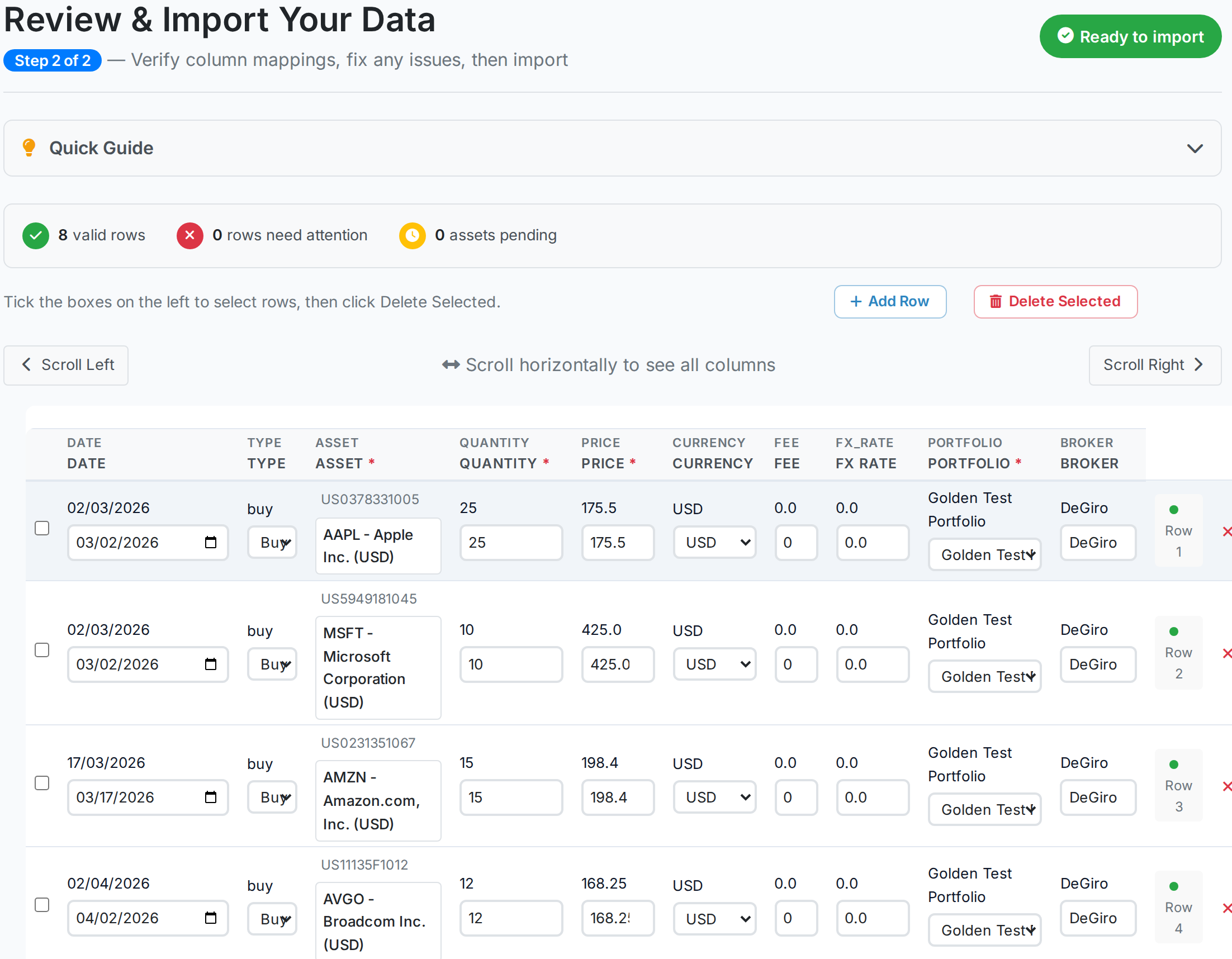
Importing your history
Portfolio Performance has a strong set of importers. It accepts PDF broker statements, CSV files with reusable column layouts, its own XML and template formats, plus exports from Interactive Brokers Flex. Its statement parsers keep growing. Version 0.87.0 added Barclays Bank Ireland, comdirect and Trade Republic.
CSV, XLSX and pasted spreadsheet rows can bring history across without a predefined layout. A hand-written sample of a European broker statement, semicolon delimited with German headers, produced eight valid trades with every security identified from its ISIN.
For an existing desktop portfolio there are two shorter routes. Portfolio Performance CSV exports transfer directly, while supported live broker accounts remain current after the first load.
 AllInvestView
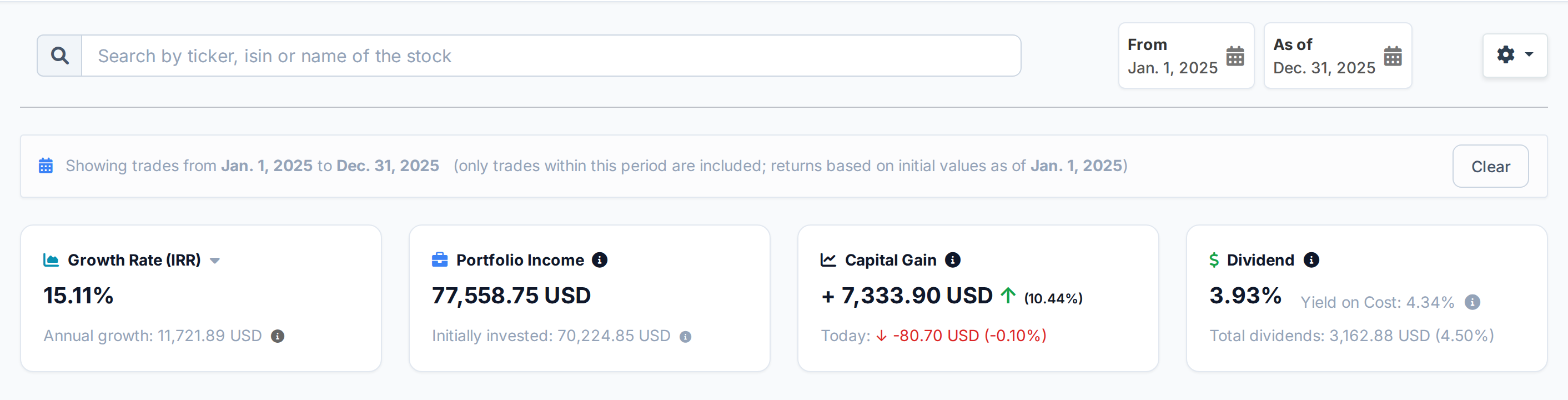
Returns between two dates
Portfolio Performance was built around calculating return properly, with True Time-Weighted Return and internal rate of return across all accounts. Reporting periods also drive its performance reports. AllInvestView keeps those figures in one online account on every device. There is no local file to keep current.
Any custom period recalculates the complete dashboard from the trades inside that span. For 2025, it reports an IRR of 15.11%. The capital gain is 7,333.90 USD and the dividend yield is 3.93%. Those figures cover only that calendar year.
 AllInvestView
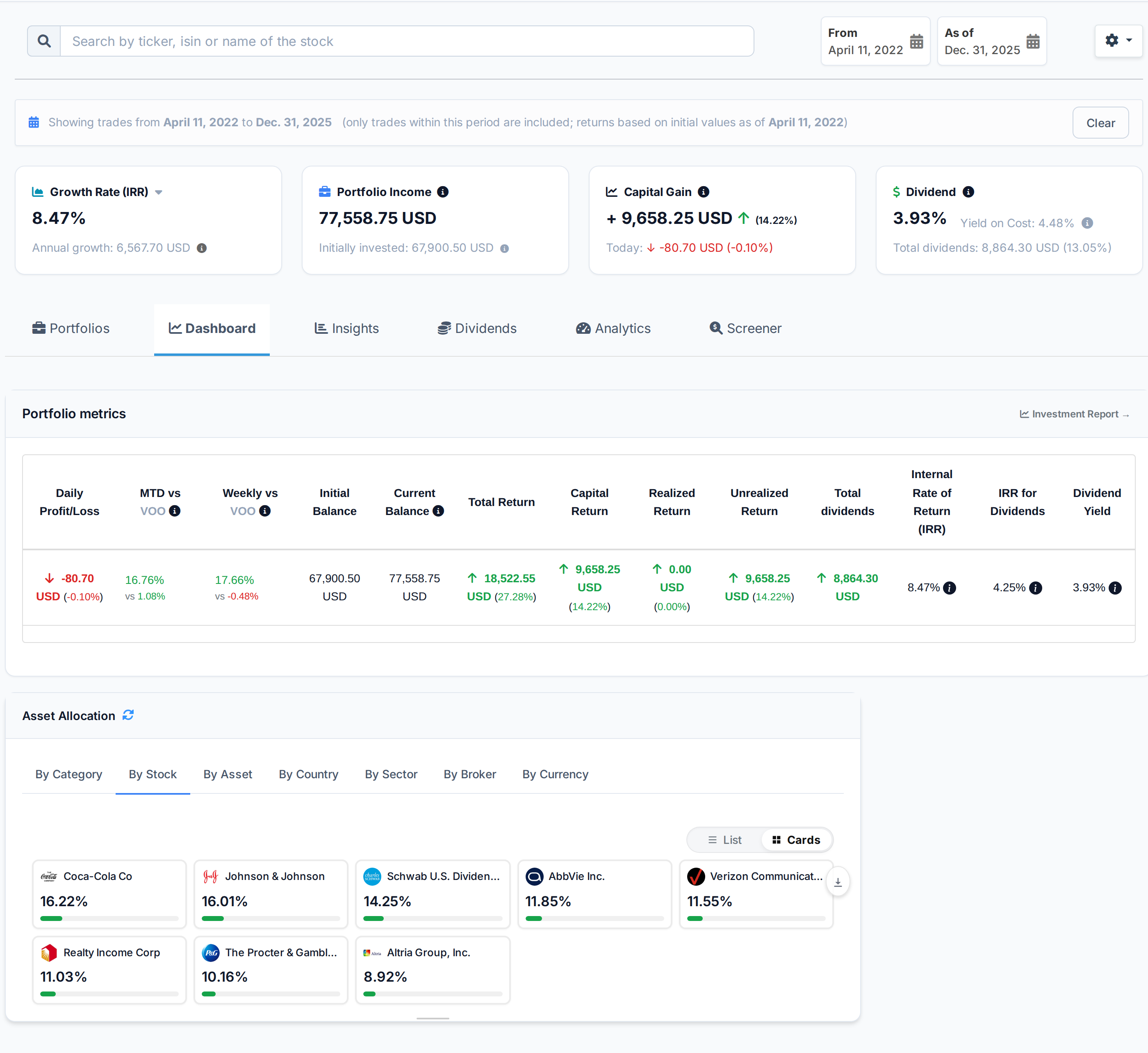
Your portfolio on a past date
Portfolio Performance can value its Statement of Assets on a past date. AllInvestView can do the same for the whole dashboard. On 31 December 2025, it shows the balance, return, IRR and dividends recorded by that day. Each holding uses its weight on that date. The figures are calculated from the complete transaction history, not a stored snapshot.
This gives you the positions open on a stated date and their value. You can compare it directly with a year-end broker statement.
 AllInvestView
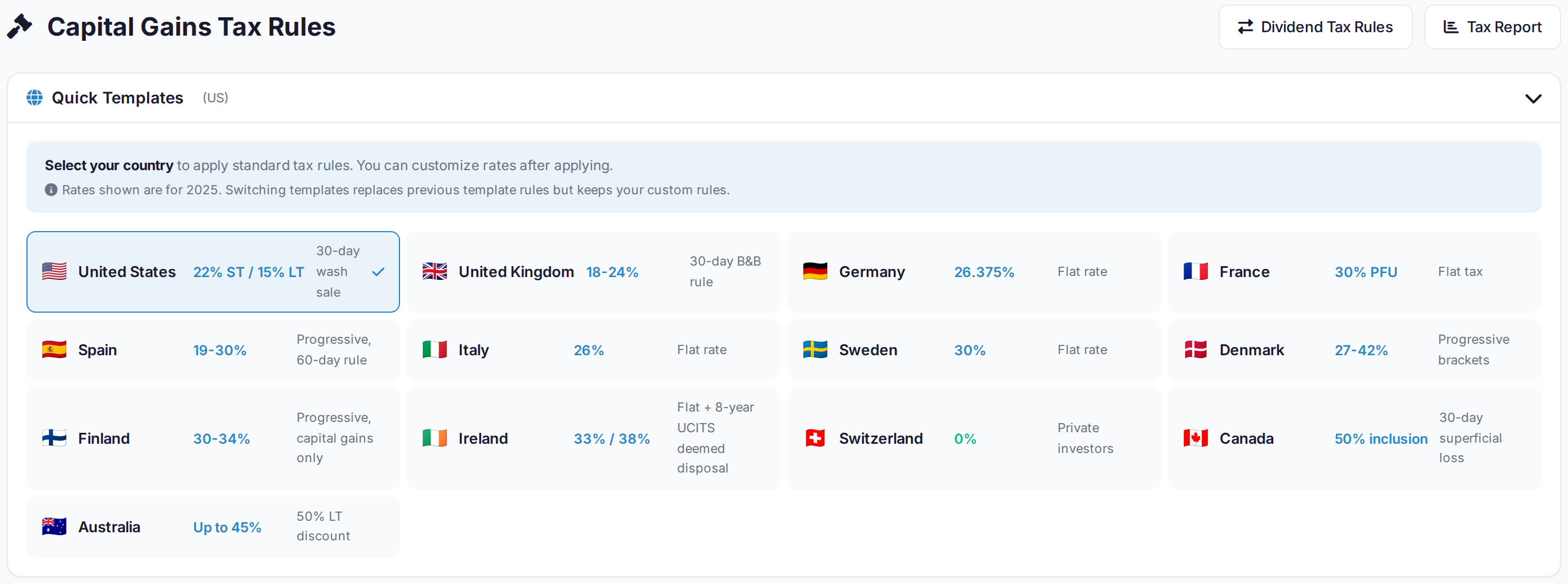
Cost basis and country rules
Portfolio Performance offers two cost methodologies, FIFO and Moving Average, and records taxes and refunds alongside the trade that caused them.
Capital gains rules start with the country. Thirteen presets include the US, the UK, Germany, France, Spain and Italy, the three Nordics of Sweden, Denmark and Finland, and Ireland, Switzerland, Canada, Australia. New Zealand makes fourteen in all. The presets also include each country's tax rates and rules such as wash sales, bed and breakfasting, deemed disposal and superficial losses.
The report runs the same disposals through average cost, HIFO, FIFO and LIFO. It shows the estimated tax for each method before you choose one.
 AllInvestView
Exporting your data
A Portfolio Performance portfolio is an XML file on a disk you own, and File > Export writes CSV and XML, with a taxonomy export to JSON. You own the file and do not need an account to open it.
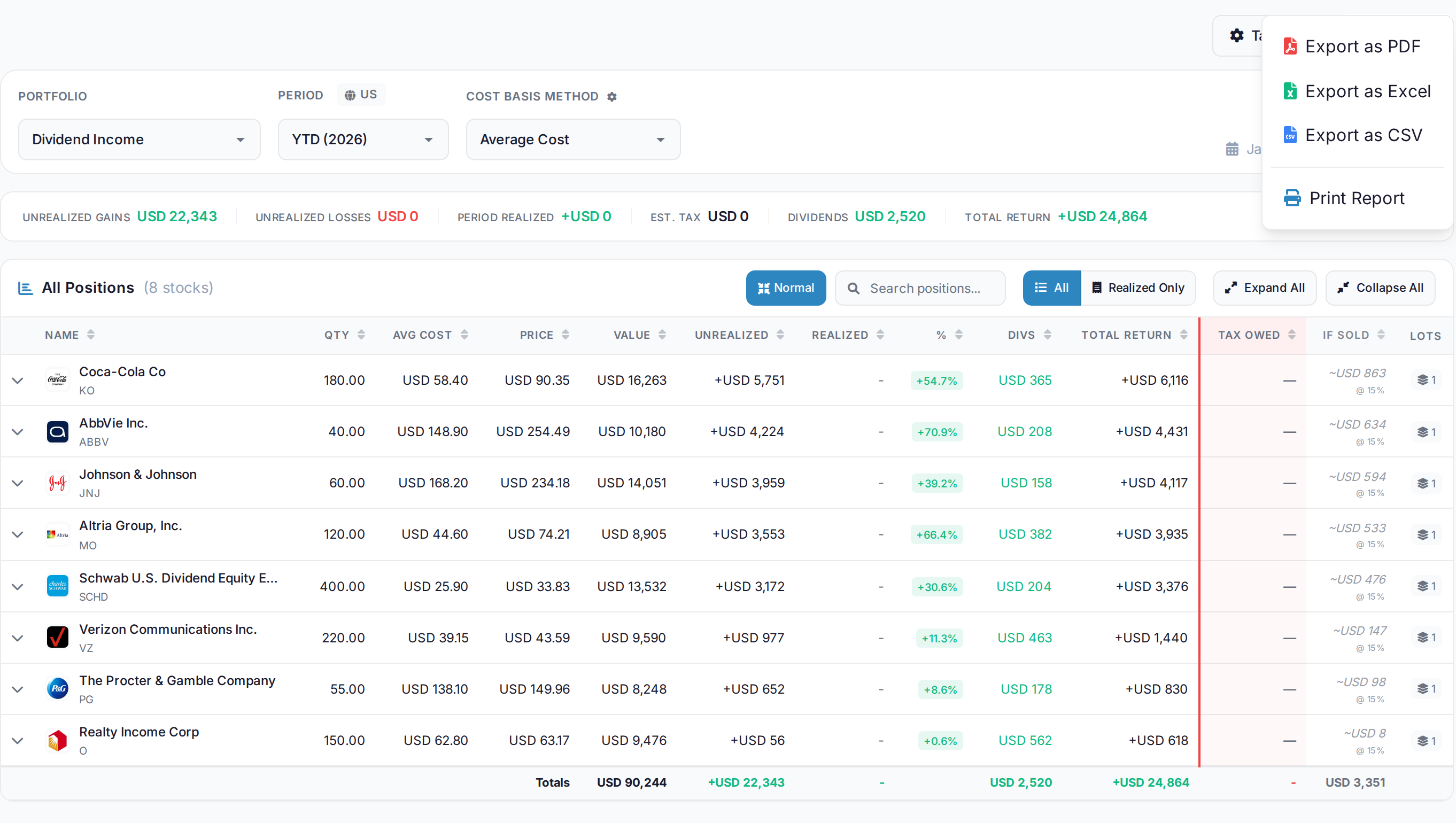
The completed tax report exports as PDF, Excel, CSV or a print view, including its positions, gains, dividends and estimated tax.
Other data can be exported too. Holdings download as xlsx, and Portfolio X-Ray and the options table have their own CSV. A spreadsheet or an accountant can open these files without a converter.
 AllInvestView
Support when a number is wrong
Support for Portfolio Performance is the community, and it is a large one. On 4 September 2026, the project had 4,100 GitHub stars, 816 forks, 8,306 commits and 374 open issues. Users and maintainers answer in its public German and English forums.
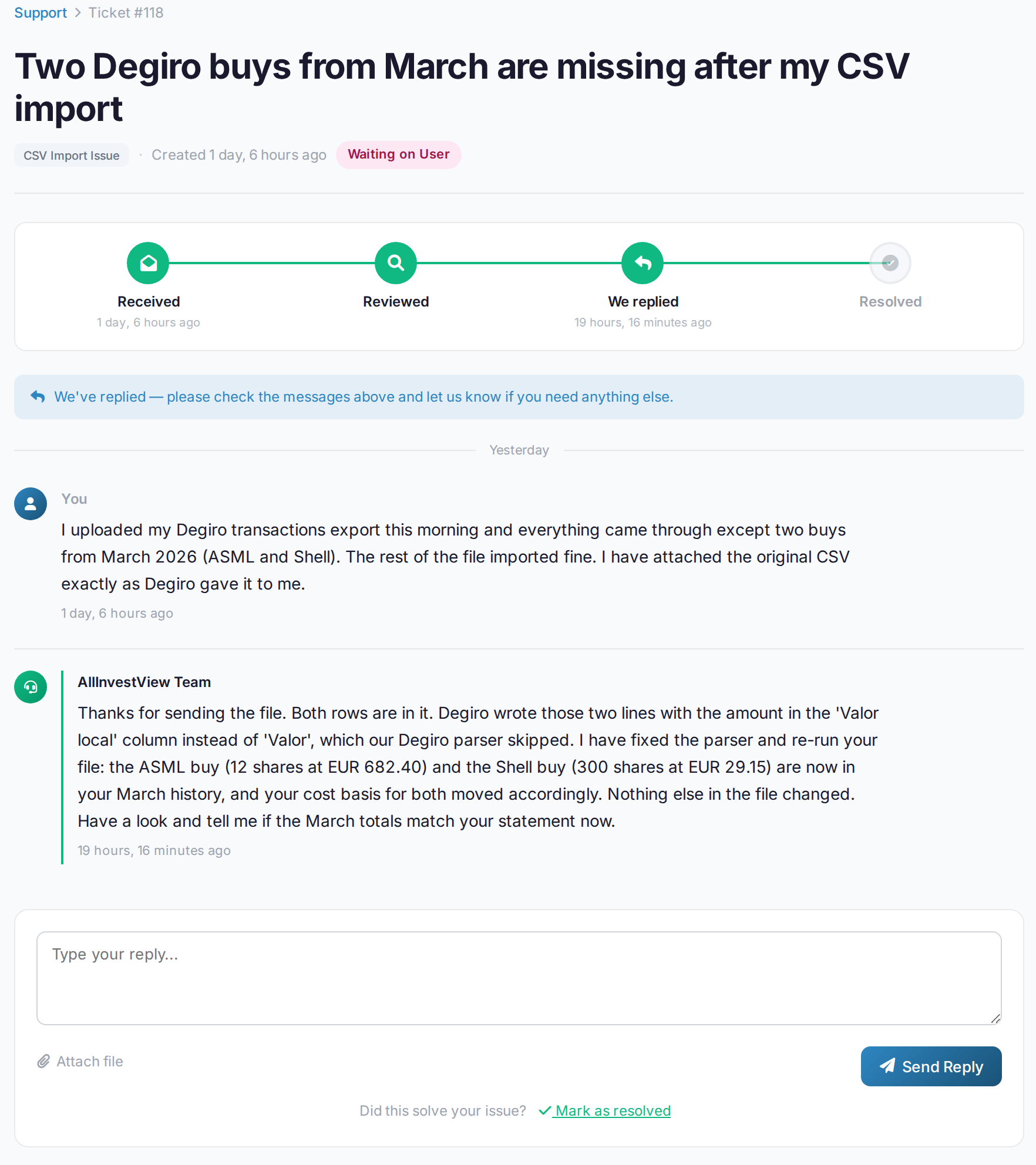
AllInvestView support is personal. A real person can check the statement or image behind a wrong figure. They can also map, reconcile and load a mismatched import from the source file. Trustpilot rates AllInvestView 4.5 from 26 reviews.
 AllInvestView
Feature Comparison
| Capability | Portfolio Performance | AllInvestView |
|---|---|---|
| Installation required | None | |
| Mobile/tablet access | Companion app | |
| Automatic price updates | ||
| Direct broker sync | ||
| Import reads any column layout | ||
| Options with Greeks | ||
| Bond yield calculations | ||
| Built-in tax reporting | ||
| 14 country rule sets | ||
| AI portfolio assistant | ||
| Open source | ||
| Offline capability | ||
| Local data storage | ||
| Automatic backups |
Cost Analysis
Portfolio Performance: The desktop application is free and open source under EPL-1.0, with no paid tier. The official companion mobile app is free for 36 of the 48 dashboard widgets; the other 12, and editing mobile dashboards, are Premium at $3.00 a month or $25.00 a year.
AllInvestView: Free trial to evaluate. Paid subscriptions for ongoing access, or a lifetime deal for one-time payment. The cost buys convenience, automatic updates, broker sync, AI features, and professional support.
Consider your time value. Hours spent configuring and maintaining PP have opportunity cost. For many investors, paying for software that is looked after is better value than free software that needs their time.
Keep the Same Record on Every Device
CSV, XLSX and copied rows in any layout can become history available from the same account on every device.
Which Setup Fits
AllInvestView covers the same portfolio record: complete transactions, return reports and the holdings as they stood on a past date. Those views stay available on the web and mobile apps without moving a file between devices.
You can calculate a return for any dates and prepare capital gains under fourteen country rule sets. It also has broker sync and support that can check an import. The account tracks bonds priced from government curves and options with Greeks.
Portfolio Performance keeps its strongest distinction: the portfolio lives in a file on your own disk, works offline and can be shaped into detailed custom reports.
Common Questions
Is Portfolio Performance actually free?
Yes. Portfolio Performance is open-source and free, with the portfolio stored in a local file. AllInvestView has a free plan and runs as a managed web and mobile service.
Can I migrate from Portfolio Performance to AllInvestView?
Yes. Export the Portfolio Performance data as CSV. Its column layout can become transaction history in AllInvestView.
Which has better security for my data?
Portfolio Performance stores data in a local file controlled by the user. AllInvestView encrypts data in a managed account and does not store brokerage passwords. The choice is local control or a managed account available on each device.
Does Portfolio Performance support options?
Portfolio Performance has no options transaction type, so a contract is held as a generic security with a hand-entered price. AllInvestView books options as their own asset class with delta, gamma, theta, vega and a live theoretical price.
Can I check my portfolio on my phone with Portfolio Performance?
Yes. Its official iOS and Android companion app reads the desktop file through cloud storage. AllInvestView runs in a browser and has native iOS and Android apps.
Which platform updates prices automatically?
AllInvestView maintains market prices automatically. Portfolio Performance updates prices through feeds configured and maintained by the user.